









Exploring Titan and Salesforce: File-Sharing Workflows

Sharing documents, presentations, and various other files is a basic requirement for all businesses. With file-sharing Salesforce tools, you can transfer text, audio, and video files directly from your Customer Relationship Management (CRM) platform.
Join us in the article below to find out how you can streamline your Salesforce file-sharing workflows.
Share Salesforce Files with People in Lightning Experience
As Salesforce can be your #1 platform for storing files, you don’t need to consider external third-party file storage solutions. Ensuring all sales documents and marketing or media content are saved in Salesforce will speed up your file-sharing tasks.
Files in Salesforce are safe and eliminate the need for employees to hunt down information across various platforms or, even worse, local PCs. Salesforce files live in the cloud, so this means that remote workers or employees who travel regularly can still access documentation whenever needed.
Set File-Sharing to Inherit Record Permissions in Salesforce
When it comes to sharing files, as a best practice, you should set your data to inherit record permissions. This configuration makes sure that the attached files receive the same settings applied to the parent record.
Working in this way will speed up configuration tasks for administrators as they will not need to investigate parent settings and then apply them to attached files each time they upload a file.
Now, when an attached file is shared with an individual, they can view it as per the parent record settings.
Titan Files: Automate File-Sharing with Salesforce Flow
Titan Files and Salesforce Flow empowers you to speed up file-sharing processes. Our app does this by connecting Salesforce to third-party storage apps if you need to archive and share content in this manner.
Take a look at a few storage integration options you get with Titan Files:
- Google Drive
- OneDrive
- Box
- And more!
Whether or not you use a third-party app, Titan Flow and Files integrate directly with Salesforce to speed up your workflows so your business can scale naturally.
Zero-Code Advanced Salesforce File-Sharing Capabilities
The best part about signing up for Titan is that you can build your file-sharing workflows with zero coding knowledge. You can also trust that your workflows are secure, as Titan provides end-to-end file security. This regulation is stipulated by many data privacy frameworks such as HIPAA, SOC 2, ISO, and GDPR.
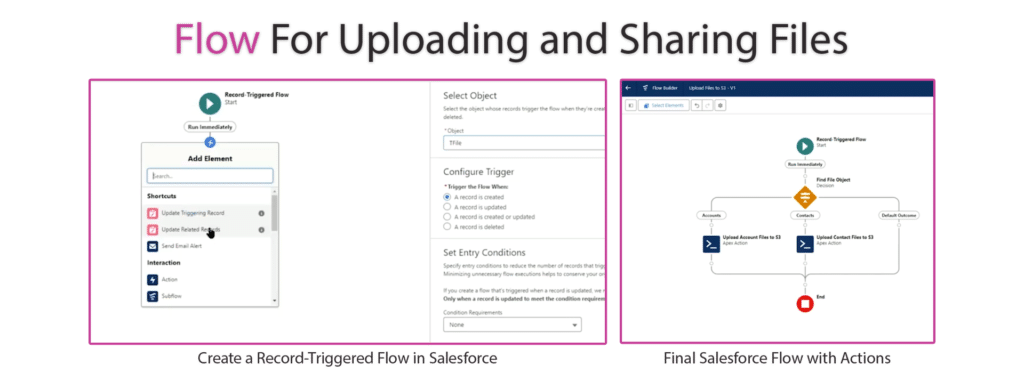
Furthermore, Titan is an advanced software, giving admins Optical Character Recognition (OCR). This feature automatically scans files, extracts text from them, and pushes the data to Salesforce records. Take advantage of this functionality to speed up file upload tasks, which is necessary for file-sharing processes.
Read and Write Files from/to Salesforce Objects
Titan Files gives you even more zero-code functionality to assist your file-sharing processes. One is reading and writing files from Salesforce objects and vice versa to create documents fast during your file-sharing process.
Take a look at some other file tasks you could automate with Titan Files and Salesforce Flows:
- You can keep your files safe with Titan’s virus-scanning features before they are uploaded to Salesforce. When employees share these files, they can trust they are secure and uninfected.
- You can perform file tasks directly in Salesforce, so there is no need to jump between platforms. It also eliminates working on multiple device screens, as you only need to access Salesforce. This is an ideal solution for employees who are on the go and need to share files instantly.
- Titan Files converts files to PDF, which is important when sharing files. PDF files lock the format and contents in documents so they cannot be edited. PDFs are also an excellent way to share a single document with a considerable amount of information.
Frequently Asked Questions
Can you share files in Salesforce?
Yes, you can. If you want to solely use Salesforce, you can share files with the Content Management system.
How do I share a file with a partner user in Salesforce?
If the file is not in Salesforce, upload it to the platform using the Attach File option or Titan. Then, you need to grant the partner user permission to view and access the file you want to share. Remember to configure the file’s sharing settings so the partner user can access it.
Now, you can confidently share the file using a Chatter feed, a Salesforce record, or a community.
Titan Files for Leading Salesforce File Management
Thanks for reading our article about sharing files in Salesforce.
Are you ready to take your Salesforce File Operations to the next level with automation?
We suggest checking out Titan Files. Our app automates any workflow, but we also provide advanced tools to merge files and combine Salesforce actions for complex processes.
Titan Files works with any file type, not just documents. For example, admins can automatically modify images to meet file-sharing standards. Admins can easily resize, compress, merge, watermark, and convert images without code when using Titan.
For more information on custom Salesforce solutions, contact us today.
We hope to see you soon!
Disclaimer: The comparisons listed in this article are based on information provided by the companies online and online reviews from users. If you found a mistake, please contact us.
You might be interested in
Writing Your First Notarized Letter Like a Pro

How to Remove Track Changes in Word

Signee Vs. Signer Vs. Signatory: What are They?

All-in-One Web Studio for Salesforce