









Effective Lead Generation with LinkedIn Lead Gen Forms

Generating leads for your business consists of attracting new customers to focus on your products and services. Today, we explore LinkedIn Lead Gen Forms and learn how to use them as a strategy to obtain more leads.
How to Use Lead Gen Forms on LinkedIn?
LinkedIn is a platform designed to let professionals network with each other. It appeared online in 2003 and is an excellent platform to create a profile of your professional achievements. Users also join the platform to connect with other colleagues and businesses.
Since there are 171.9 million users on LinkedIn, you might find that it is a great source for generating leads. You can accomplish this task with LinkedIn’s feature called Lead Gen Forms.
The way that lead generation works on this platform is with the LinkedIn forms feature. It’s integrated into ads and businesses use these adverts to gather data from LinkedIn leads.
How to Generate Leads from LinkedIn Forms
LinkedIn Lead Gen Forms are effective at collecting data from visitors. Here is a simple guide on how to use Lead Gen Forms from LinkedIn:
Go to Campaign Manager in your LinkedIn account and select Create Campaign. This step will help you create a lead-generation campaign.
Now, you can select an objective for your campaign, like Lead Generation in LinkedIn. Then, choose a format for your advert. Some of the options include Sponsored Content or InMail.
Next, you should add a target audience. You will need to consider criteria like the location and job titles of your leads.
After you have configured the campaign, it’s time to select your budget and schedule. LinkedIn lets you choose between a daily or total budget option.
Now, add the content for your advert. You want to present images, headlines, and text that will grab the attention of leads on LinkedIn. During advert creation, you can also add a LinkedIn Lead Gen Form by clicking on Create New Form.
This button provides a form for you to customize. Build the form with fields to collect the information you want from leads. As a pro tip, remember to keep your form short and sweet, as these types are more successful at collecting data.
Next, you can write an introduction for the form. Make sure that it is encourages people to fill it out. The introduction message will be displayed to readers before they start interacting with the form.
It’s also a good idea to write a thank you message. It will be displayed to people who have filled out and submitted your form. It is also an opportunity to tell a LinkedIn lead more about your business, share contact details, and spur further interaction.
And that’s basically it! All you have to do is review your efforts and launch the campaign.
As people start clicking on the advert and filling out your forms, the data will be sent to LinkedIn’s Campaign Manager. You can use it to track user clicks, their impressions, and lead generation on LinkedIn.
LinkedIn Ads for Lead Generation
LinkedIn gives us advertising tactics directly on its platform to generate leads. With LinkedIn Ads, businesses can design adverts to collect lead data. Some typical information collected through LinkedIn Ads for lead generation includes email addresses and contact details.
By using LinkedIn to generate leads, your business can find high-quality leads and extend its brand awareness. Let’s take a look at some other benefits to gain from turning to LinkedIn for lead data.
LinkedIn for B2B Lead Generation
LinkedIn has over 170 million professionals you can connect with! So, it’s a good place to implement your business-to-business marketing strategies and generate leads from LinkedIn.
One of the benefits of using lead gen ads on LinkedIn is that your campaigns can target specific categories, like job titles. This is an important feature for getting leads from LinkedIn. It makes sure adverts are seen by your chosen target audience.
Identifying the Right Leads
Another benefit you gain from using LinkedIn Ads is that your leads will be high-quality matches.
Since LinkedIn users create detailed profiles with accurate information about themselves, you can trust you are targeting the correct individuals.
If you want to, you could also direct campaigns at specific decision makers, like managers. Their information is readily available on LinkedIn.
LinkedIn Lead Generator Strategies
When it comes to lead generation, LinkedIn has a range of strategies, tools, and services. As LinkedIn is designed to create opportunities for professionals and businesses to network, it is also a good place to use LinkedIn lead generation forms.
However, one of the most common LinkedIn lead generator methods used by marketing and sales professionals is to join the platform with a close-to-perfect profile.
For example, marketers create professional profiles with the following elements to get the most optimized profiles:
- Appropriate pictures
- Entertaining headlines
- Detailed job descriptions
- A list of authentic skills and experiences
Authentic profiles are trusted more than those without pictures and filled-in sections. This allows professionals to approach and interact with leads successfully.
LinkedIn Lead Gen Form Examples
If you haven’t seen them before, take a look at the example images below of LinkedIn Lead Gen Forms.
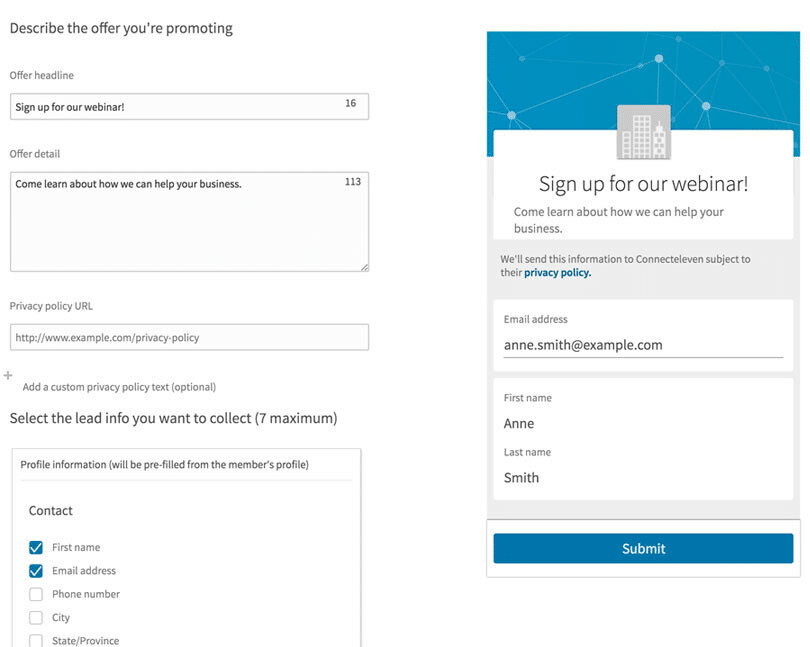
Do you want more Lead Gen Forms and LinkedIn examples? OK, this is what you see on a mobile device.

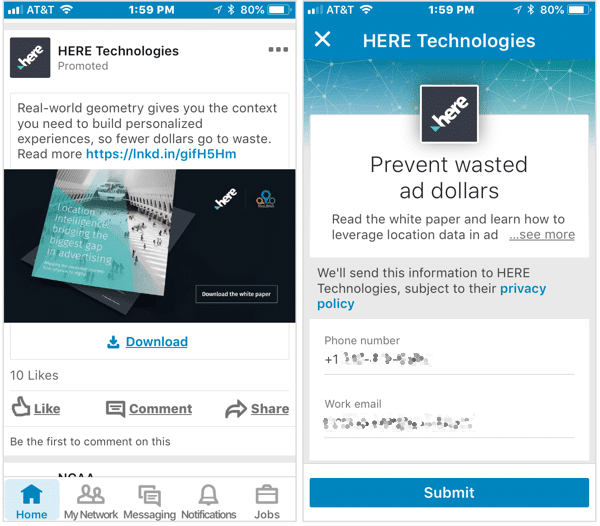
Here is a final image of a LinkedIn lead generation form in an advert:
Best Practices for LinkedIn Lead Gen Forms
To make the most out of your LinkedIn lead forms, we have two pieces of advice.
1. Create Attractive Content for Forms
You want to deliver clear messages in your form’s headline and description. Interesting or hot-topic content will encourage your target audience to fill out and submit the form.
2. Build Lightning-Fast Forms
Your lead generation contact forms should be short and concise. You can design them to have minimal fields so you only ask leads for essential information. Long forms often put readers off, resulting in them discarding or ignoring forms.
A LinkedIn & Salesforce Integration
Connecting Salesforce and LinkedIn is a smart strategic decision. To create this type of software integration, you need a Salesforce and LinkedIn connector. You can find LinkedIn Sales Navigator for Salesforce on the AppExchange marketplace to connect these two platforms.
Once connected, you can use LinkedIn Lead Gen Forms with your Salesforce integration to improve lead generate tasks and calculate future sales.
LinkedIn for Salesforce Forms
When you integrate LinkedIn with your favorite CRM platform, you get the LinkedIn for Salesforce Forms feature. It’s used to collect lead data from LinkedIn campaigns and adverts.
When LinkedIn and Salesforce are integrated, the lead data is synced directly to your CRM platform. Then, you can go ahead and use Salesforce’s tools to manage the collected data and assign leads to the right sales agents.
Frequently Asked Questions from Titan Readers
How do LinkedIn Lead Gen Forms work?
They automatically generate leads from LinkedIn adverts and campaigns.
How do I activate lead generation forms on LinkedIn?
You need to go to Campaign Manager in your account, click on Create Campaign, and then choose Lead Generation as your objective.
Now, you can design the advert and set up the criteria for your target audience. Remember to select Collect leads using LinkedIn lead gen forms when configuring the format of your advert.
Next, you can activate a lead generation form by clicking on Create new form. Design your form and provide a thank you message that will be displayed to respondents who provide submissions.
Review your campaign and then click on Launch campaign to start generating and tracking leads.
How to collect leads on LinkedIn?
There are many strategies that you can use to gather lead data from LinkedIn. A quick method is to create a professional profile. A LinkedIn profile that has a picture and showcases expert skills is the way to go. You can also add keywords to your profile so that leads can find you easier on LinkedIn.
Do you have to pay for LinkedIn lead gen forms?
Yes! You need an advertising budget to use LinkedIn Lead Gen Forms.
What is the best way to generate leads on LinkedIn?
The best method to generate leads from LinkedIn will depend on your marketing or sales requirements and available budget. Here are a few techniques you could try to generate leads:
- Complete your LinkedIn Profile to the max and make it stand out with a picture.
- Add interesting content to posts regularly that market your products and services.
- Remember to join LinkedIn groups. You will have more opportunities to meet people that fit your target audience.
- Try creating a LinkedIn Ad which uses a LinkedIn Lead Gen Form to generate and track leads.
- When asking an individual to connect, write a personal greeting.
- Stay active on LinkedIn by liking and commenting on posts.
- Use LinkedIn to post articles and blogs directly on the platform, and share them with connections.
- Try the LinkedIn Sales Navigator feature to access search and lead filtering tools.
Wrapping Up Lead Generation with LinkedIn Forms
Thanks for reading our article on the LinkedIn Lead Gen Forms feature. It can be used to generate and track lead data. We also briefly touched on the topic of Salesforce Forms for lead generation. If you would like to know more about forms for Salesforce, please feel free to reach out to us.
Our Titan Forms app creates custom Salesforce forms from any object for any use case. We can help you collect and pre-fill data, use conditional logic, and automate business processes with our drag-and-drop Salesforce forms builder.
Titan Forms is the only product on the market with real-time Salesforce integration and a 4.96/5 star rating on the AppExchange marketplace.
For more information on how Titan can support lead generation and management activities, contact us on one of our social media channels below.
We hope to see you soon!
Disclaimer: The comparisons listed in this article are based on information provided by the companies online and online reviews from users. If you found a mistake, please contact us.
You might be interested in
Writing Your First Notarized Letter Like a Pro

How to Remove Track Changes in Word

Signee Vs. Signer Vs. Signatory: What are They?

All-in-One Web Studio for Salesforce