








Keep Business Processes Stable with Salesforce Test Automation

Do you want to know how many customers have stopped using your products and services in the last month? As scary as this information might be to confront, it can give you a benchmark for where your business sits in the market. From there you can make plans to retain customers, win back lost customers, and acquire new ones.
If you are ready to take the plunge and find out more about churn rates, also known as customer churn and attrition rates, join us in the article below. We cover the meaning of churn rates and how to calculate them with a simple formula. We also end the article with a list of advantages and disadvantages of working with churn rates.
Let’s get started!
Our Churn Rate Meaning
Customer churn rate is a business metric used to calculate the number of customers who stop using a company’s products, services, or subscriptions. Churn rate is usually studied over a period of time in percentages and is super important for businesses that adopt a subscription-based model since it can monitor revenue and growth indirectly.
How to Calculate Churn Rate
The formula that many managers use for calculating churn rate can be seen below:

The Churn Rate Formula Explained
The churn rate calculation above suggests that the company had 500 customers at the beginning of the month and 450 customers by the end of the month. By plugging these details into the formula, we see that the company has lost 50 customers during the course of the month. Therefore, we can conclude that the company has a customer churn rate of 10%.
Advantages and Disadvantages of Using the Churn Rate Metric
Churn rates help various business units learn how many customers they have lost over a set period of time. This is valuable information to support customer success and marketing teams with strategies to retain customers and subscribers. However, like anything in life, it is not perfect.
Let’s dive into the benefits and limitations of this key business metric.
Benefits of Calculating Churn Rate
One of the advantages of choosing to work with churn rates is that they use a simple formula and are easy to calculate. The percentage that the formula spits out gives you a clear indication of how many customers your business has lost.
Here are a few more ways business teams can gain an upper hand by using churn rate calculations:
- They provide an early warning sign to teams that work directly with customers. By monitoring the churn rate, customer service teams can find out what is bothering customers. Could it be a dislike for new products or bad customer service? This type of early investigation can help teams create strategies that solve issues to retain customers before situations get out of hand.
- Churn rates can also be used to gauge customer satisfaction levels. For example, a high churn rate means that your customers have left you because they are unhappy with your products and services. With this information, business teams can investigate ways to improve their interactions with customers.
- The churn rate also supports predictions for how much revenue your business could lose from a decrease in customers. Therefore, teams should regularly view churn rate data and decide if they need to create new plans to support revenue growth.
Limitations of Churn Rates
As we learned in the advantages of churn rate, the metric supports many different business units. However, by itself, churn rates do not give us the bigger picture. Sure, a churn rate tells us the percentage of customers that have left a business, but this metric does not tell us why.
There could be many factors that contribute to churn rates, like product prices being too expensive or limited services available in certain locations. Without understanding the real issue of your churn rate, it would be difficult to create strategies to improve your customer loss situation. Here are a few more limitations of the churn rate metric:
- It only measures the percentage of customers who have stopped purchasing products and services. What about the new prospects you managed to convert to customers? For this reason, looking at churn rate alone gives an incomplete view of company health as it does not take into account growth rates.
- The churn rate is poor at segmenting customers. We all have different types of clients. Some purchase in small amounts, and others are big spenders. So, if your business lost one of these segments, it might not have such a big impact on business relationships. But, we are unable to dig deeper into the churn rate and figure that out, which could lead to misinterpretation of data.
- Another disadvantage of solely measuring churn rate is that if does not identify when customers stop purchasing products and services. Some key times could be after signing up for a service or only after several months of using a product. If business teams could learn when customers are leaving, they could create plans that fix the issues those time periods are presenting.
Churn Rate Vs. Growth Rate
Our next topic covers growth rates and how it differs to churn rates. Churn and growth rates both contribute to evaluating how healthy a business is and can be used to predict its trajectory in the future. They are useful for businesses that have adopted the subscription-based models.
However, they are distinct and provide different information about a company’s customers. At a high level, a churn rate measures customer loss, whereas the growth rate measures the number of new customers a business acquires.
A Retention Rate Calculation
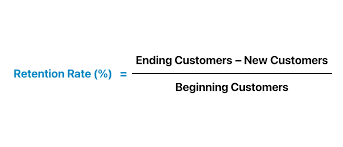
We have given you a definition of churn rate and growth rate. However, retention rate is another key metric for business teams to understand customers in more detail. This metric provides the percentage of customers who loyally use a company’s products or services over time.
Here is a formula that you could use to work out retention rates:
Expanding Your Knowledge About Business Solutions
Thanks for reading our article on churn rates. At Titan, we like to solve business solutions at scale to accelerate business growth. If you liked our article and want to find out more about taking your business to the next level, please contact us through one of our social media links below. We can help you conquer code, build projects, and optimize processes for Salesforce.
See you soon.
Disclaimer: The comparisons listed in this article are based on information provided by the companies online and online reviews from users. If you found a mistake, please contact us.
Frequently Asked Questions
What is churn vs. turnover?
They are terms often used in the business and HR sectors, but can have different meanings depending on the context. When it comes to the term “churn”, it is used to describe the rate at which customers stop using the products and services of a subscription-based business. This percentage of customers is tracked at a certain period of time. If you want to know more about churn rates, please refer to our article above.
So back to the definitions, the term “turnover” refers to the rate of employees leaving an organization with their roles being refilled. If you work in an HR industry, you might have heard your colleagues use the term employee turnover to describe this scenario.
What is the KPI for churn rate?
A churn rate is a Key Performance Indicator (KPI). The calculation of churn rate can measure the percentage of customers who no longer use a company’s products and services at a certain point in time. Subscription-based businesses use this KPI to measure their health as well as to get a better understanding of how to retain customers.
What is a reasonable churn rate?
That answer depends on a company’s criteria, its business model, and the industry it operates in. However, there are some common standards you might want to consider when deciding if you have a reasonable churn rate. We suggest researching the one that matches your business sector.
However, as an example, subscription-based businesses in the SaaS industry usually have a monthly churn rate of 1-5% per month and 10-30% per year.
How to reduce churn rate?
There are many methods to do this. One way to reduce a churn rate would be to elevate your customer’s onboarding experience. With a special onboarding program, new customers learn how valuable the products and services they purchased are.
This information will motivate them to keep purchasing products and services since it gives them confidence about the value they receive from staying in your ecosystem. Here are a few tips to upgrade your onboarding experience for customers:
- Create exciting and personalized welcome guides.
- Draft and share easy-to-understand tutorials about your products and services.
- Give new customers comprehensive product walkthroughs.
- Provide access to webinars and live demonstrations.
- Share insightful videos, articles, and frequently asked questions.
Is churn rate calculated monthly or annually?
Churn rates can be calculated monthly and annually. So, choose when you would like to measure your churn rate based on your business model and goals.
You might be interested in
Writing Your First Notarized Letter Like a Pro

How to Remove Track Changes in Word

Signee Vs. Signer Vs. Signatory: What are They?

All-in-One Web Studio for Salesforce