








DocuSign CLM: Integration Guide for Salesforce

Salesforce is the world’s leading customer relationship management (CRM) platform. For this reason, many other platforms and applications love to integrate with Salesforce. DocuSign CLM is one of those platforms that can connect with Salesforce to streamline contract lifecycle management tasks.
However, integrating any software with Salesforce can be complex as you must consider multiple data sources, data transfers, custom objects, and complicated workflows. Do you need an integration guide to connect Salesforce with DocuSign CLM?
Keep reading our article for step-by-step Salesforce DocuSign integration instructions and other exciting topics on DocuSign and Salesforce.
What is DocuSign CLM for Salesforce?
Let’s start our article by explaining CLM and its capabilities in Salesforce. Previously known as SpringCM, DocuSign is widely prevalent among businesses. They have over 3000 reviews on the Salesforce AppExchange marketplace and have been in the industry for over a decade.
Many organizations use DocuSign and Salesforce integration to automate contracts from within Salesforce. By doing so, they make the most of their Salesforce platform and streamline many contract lifecycle management processes.
DocuSign has many applications that integrate with Salesforce, allowing employees to create, electronically sign, modify, and work with contracts.
DocuSign CLM Features
So, now that we know what DocuSign can do on a high level let’s dive deeper and uncover its features:
- DocuSign integrates with Salesforce and can scale according to the increase in your business operations.
- Employees can use DocuSign’s automation features to speed up contract tasks, decreasing turnaround times for agreements.
- Contracts can contain merged data from customers, products, and pricing so that your sales reps can generate accurate documents.
- Your business can reduce risks and errors found in contracts from manual tasks like copy-pasting of data.
- You get to increase the overall productivity of your workforce by automating repetitive manual tasks. Your employees now get to zone in their focus on just working in Salesforce.
DocuSign CLM Pricing: How Much does DocuSign CLM cost?
If you head over to DocuSign CLM’s website, you must request a quote from the sales team to determine how much the platform will cost.
Alternatively, you can find DocuSign CLM on Salesforce AppExchange. When writing this article, the default plan for DocuSign CLM starts at $45 per user per month. However, there are discounts available for nonprofit organizations.
DocuSign Salesforce Integration Guide
As promised, here is your DocuSign CLM and Salesforce integration guide.
1. Prepare for your configuration by getting admin access and permissions to integrate Salesforce with DocuSign CLM.
2. You need to install the DocuSign CLM package. Find it on Salesforce AppExchange and click the Get It Now button.
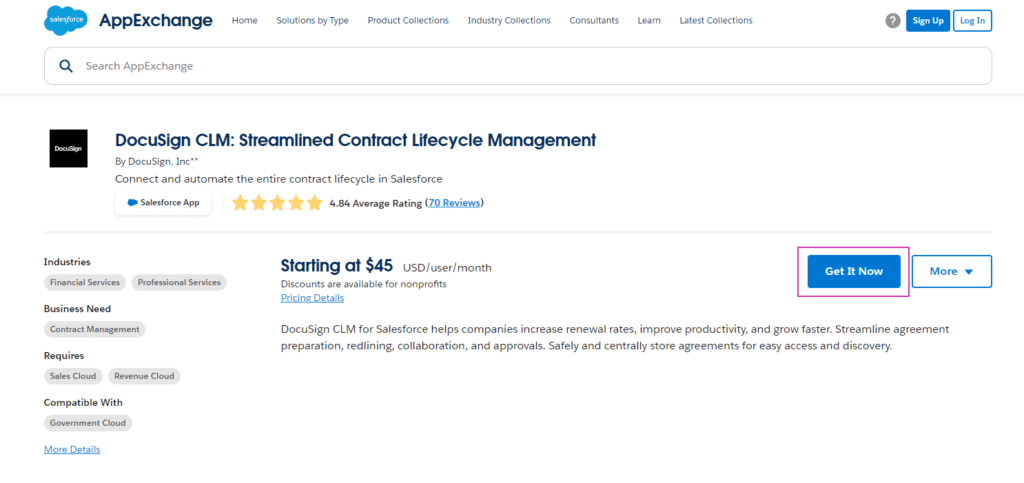
3. Go to Salesforce > Setup > App Setup > Installed Packages and select the DocuSign CLM package.
4. Connect Salesforce and DocuSign CLM using the setup wizard.
5. Map your fields between Salesforce objects and DocuSign CLM.
6. Create automated workflows with Salesforce Process Builder, Flows, or Apex triggers in Salesforce so your employees can generate and send contracts from DocuSign CLM.
7. Test your connection between Salesforce and DocuSign Contract Lifecycle Management and verify that your data and documents can sync between the platforms.
8. If your integration between Salesforce and DocuSign CLM is successful, you can start training your teams on using the platforms effectively to streamline contract lifecycle management tasks.
We hope that DocuSign for Salesforce guide was helpful. These steps might not relate to your specific use case as you might have installed a particular version of Salesforce or DocuSign CLM.
For this reason, always refer to the documentation provided by Salesforce and DocuSign to get the most accurate information. If you still need help integrating DocuSign CLM into Salesforce, make sure to contact a DocuSign consultant.
How to Use DocuSign in Salesforce: DocuSign CLM Salesforce Integration Guide
Now that you have connected Salesforce and DocuSign CLM, it’s time to start working more effectively with those contracts.
Start by creating templates that you can use to generate contracts in the future from Salesforce. Including placeholders in your templates for dynamic Salesforce data is good practice. Next, you can configure your document generation rules in Salesforce by clarifying when contracts should be generated. For example, many organizations generate documents when specific conditions are met, such as when the Opportunity stage closes.
Now, you can use Salesforce to generate contracts with templates created by DocuSign CLM. Before sending your contract for signing, remember to review and edit the contract if it is required.
Once your contracts have been sent to recipients, you can monitor the document’s status inside Salesforce. Many employees use DocuSign features to track when an agreement has been sent, electronically signed, or idle and waiting for approval.
When signed contracts are returned to your business, you can store them and any related documents in Salesforce or DocuSign CLM. The data collected by DocuSign CLM and Salesforce can then be analyzed by tools to create reports that provide valuable insights into contract lifecycle management processes.
DocuSign CLM Integrations
So, DocuSign might seem like a great CLM solution for your Salesforce workflows, but it’s not a perfect application. For an objective view, let’s look at some of the limitations of a Salesforce and DocuSign CLM integration.
- According to online Salesforce AppExchange user reviews, DocuSign CLM does not value customers.
- DocuSign CLM’s support team lacks training or care when dealing with customers.
- DocuSign is complicated to set up and needs a trained DocuSign agent to connect the application with Salesforce.
- The time required to integrate DocuSign with Salesforce is lengthy, even with an implementation partner.
- When customers open support tickets for queries with DocuSign, they receive marketing information on professional services on offer to purchase.
- DocuSign CLM’s prices do not seem appropriate for the support or value you receive compared to Salesforce’s support team and community.
As you can see, integrating DocuSign CLM into Salesforce is a challenging feat. If you want a reliable CLM solution that integrates 100% into Salesforce, we suggest you try Titan CLM. Take a look at some of the features that you get with Titan CLM for Salesforce:
- Collaborate with all parties involved in the contract online or locally.
- Add rounds of collaborations to your contract journey.
- Gain the power to approve or reject contracts.
- Access to automated mail approvals.
- Let multiple signers electronically sign your contracts.
- Track everything related to contract lifecycle management tasks in Salesforce.
This is just a short list of the Titan CLM capabilities. If you have a custom CLM process flow that needs to be streamlined, contact us on our social media channels below. We would love to extend your Salesforce experiences.
And, if you are a Titan superfan, you know by now that this is the part of the article we use to answer some frequently asked questions. Let’s jump in.
Frequently Asked Questions
Can DocuSign integrate with Salesforce?
DocuSign can integrate with Salesforce but not easily, according to online reviews on AppExchange.
Can you use CLM DocuSign without Salesforce?
While you can integrate DocuSign CLM with Salesforce, it can also be used without the CRM platform.
What are the benefits of a DocuSign integration with Salesforce?
This integration lets you automate tasks to reduce manual processes associated with contracts and sales. However, it can also streamline many operations in your business that work with contracts.
Titan CLM: Best Contract Lifecycle Management Software in Salesforce
Contract lifecycle management is a long and complex process. We hope you found this guide on integrating DocuSign CLM into Salesforce for your CLM management needs helpful. However, getting this integration up and running takes work.
Check out our contract lifecycle management software if you want a powerful platform with CLM and other Salesforce solutions. Titan CLM can track, change, and send automated updates to all parties signing an agreement. We integrate 100% into Salesforce so you can view all changes in your favorite CRM platform or via email. Interesting to you? Reach out to us today.
We hope to see you soon!
Disclaimer: The comparisons listed in this article are based on information provided by the companies online and online reviews from users. If you found a mistake, please contact us
You might be interested in
Writing Your First Notarized Letter Like a Pro

How to Remove Track Changes in Word

Signee Vs. Signer Vs. Signatory: What are They?

All-in-One Web Studio for Salesforce