









Feedback Management with Salesforce Surveys

Make the most out of your customer relationship management strategies by using Salesforce surveys that gather insightful data from your target audience. And if this sounds like a daunting task, don’t worry about it. You can automate your whole data-collection process from end to end! The right powerful survey builder tool can help you adjust your data workflows to seamlessly adapt to processes that need to scale rapidly.
In this article, we will be taking a deep dive into Salesforce surveys and Salesforce Feedback Management. Keep reading to find out more!
See the video below for more details on how to leverage Salesforce data to simplify work.
What are Salesforce Surveys?
Salesforce Surveys is a feature provided by Salesforce. You can use this nimble survey tool to create survey forms and analyze data. Once you have set up surveys in your Salesforce ecosystem, you have the power to give specific users access to create and distribute surveys, as well as view survey records. Take a look at our short list of other things you can do with Salesforce Surveys:
- You can create custom permissions for users.
- You have access to design options that customize your survey to match the look and feel of your brand.
- Salesforce has a good range of question types that you can use when building an engaging survey.
- Try out conditional logic to enhance the user experience for your respondents.
- You also have the option to add Net Promoter Score (NPS) and Customer Satisfaction (CSAT) scores to your workflow processes if you need them.
And along with this popular survey tool, Salesforce also brings you Feedback Management to help your teams gather data from various communication channels. Salesforce Feedback Management was released in Salesforce’s Summer ‘20 release and is designed to extend and complement the Salesforce Surveys feature. Feedback management surveys empower you to collect data from multiple sources to elevate the customer experience.
Salesforce Survey License
When working with the Salesforce Feedback Management feature, keep in mind that there are three types of Salesforce feedback management licenses which include Survey Response Pack, Feedback Management – Starter, and Feedback Management – Growth. You can compare the different versions and their unique capabilities on the Service Cloud on Salesforce.
Creating a Survey in Salesforce
Now that you know how useful Salesforce surveys are for collecting data for your marketing, sales, and customer relationship strategies, let’s take a closer look at how to make a survey in Salesforce. There are many different survey types but to build your own Standard Survey in Salesforce, follow these 10 simple steps:
1. First, enable the Surveys feature by clicking Setup, typing Survey in the Quick Find box, and choosing Survey Settings. After this, simply toggle Surveys as enabled. You can also choose whether or not Survey owners can manage responses. It’s also possible to create surveys for users of Experience Cloud if you so desire.

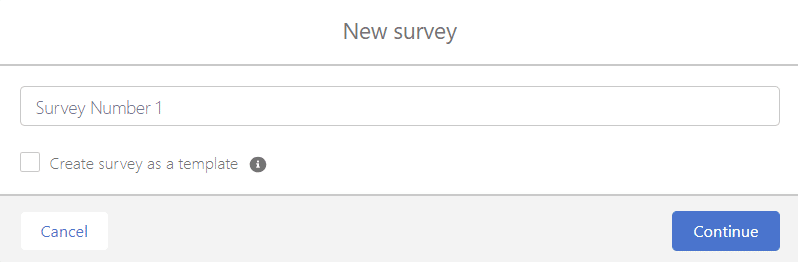
2. After this, from the App Launcher, select Surveys, then New, and name your Survey:
3. Your Standard Survey will open where you can enter a custom welcome, message and describe your survey:

4. It’s simple enough to add questions by clicking on Add Page on the left of the screen and clicking on Add Question:

5. Choose from a multitude of question types:

6. In this example, we have chosen a Like or Dislike question. Simply enter your question and describe it:
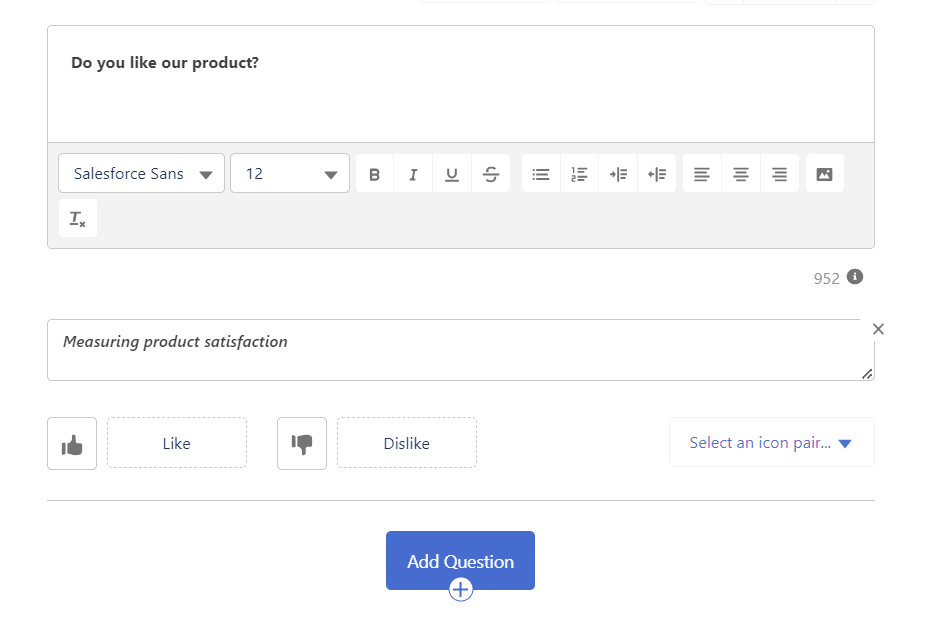
7. Add as many questions as you need, it’s possible to reorder questions by clicking on the arrows or change its properties by selecting the gear icon. Don’t forget to add a message to your thank you page.
8. Now it’s time to customize your survey! Click on the “Branding“ tab and choose your branding, logo, and theme options.

9. If you want to keep working on your survey, click Save. If you are happy, simply preview and then activate it.
10. Your survey will now be sent to participants.

Remember, this is simply a guide to creating a Standard Survey. To learn more about other surveys you can create in Salesforce, visit this help documentation on the Service Cloud.
Salesforce Survey Limitations
Yes, Salesforce Surveys is a huge help when it comes to creating Standard and Basic surveys for your business, but what are the Salesforce survey limitations? No piece of software is perfect, so what’s the catch when it comes to the Salesforce Surveys feature?
For starters, you will need some coding experience or technical help if you want to fully customize your surveys. It can be a complicated process, and since the Salesforce platform is not solely a dedicated survey builder, the survey tools are not always as great at gathering or reporting on data as some competitors.
Additionally, when looking at Salesforce’s more sophisticated and robust survey products and options, the prices start to climb. For example, if you choose the Salesforce Survey Response Pack, you only get 1000 responses with Salesforce Customer Lifecycle Analytics as an Add-On. If you require more advanced features like Post-Chat Surveys, Merge Fields, Data Mapper, and Customer Lifecycle Maps, you will have to choose another package. You can take a look at a comparison of the editions and features on Salesforce.
Types of Salesforce Surveys
Despite a few limitations, Salesforce Surveys is still a powerful and popular tool to create surveys, distribute them, and collect data from a target audience. There are many different types of ways to organize feedback management in Salesforce. Here are a few below:
Customer Satisfaction (CSAT) Surveys
As the name suggests, use CSAT surveys to measure feedback on customer satisfaction regarding your products and services. Rating scales are popular types of questions to use on CSAT surveys to gauge the satisfaction levels of customers.
Net Promoter Score (NPS) Surveys
Use NPS surveys to find out how loyal your customers are to your brand. The feedback from these surveys can determine whether your customers are likely to refer your products and services to friends or family members.
Employee Feedback Surveys
These are standard tools for businesses to collect feedback from their employees. The types of surveys can range from employee satisfaction surveys, to employee engagement surveys and even pulse surveys.
Product Feedback Surveys
Product feedback surveys gather feedback on the opinions that customers have regarding your products. Responses can be analyzed and used to make business decisions that prioritize tasks to enhance your product offerings.
Service Experience Surveys
These surveys are great tools to use to find out which of your service teams are performing well and any areas of direct customer engagement you can improve.
Market Research Surveys
Use Market Research Surveys to collect information on market trends, what customers prefer, and data on your competitors.
Event Feedback Surveys
Event Feedback Surveys are commonly used after an event has been hosted. Many businesses distribute these surveys to guests in order to gather feedback regarding the event such as the overall experience, the content, and if there are any suggestions to improve the event.
Website Feedback Surveys
Embed your Website Feedback Surveys directly on your webpage so that online visitors can immediately submit feedback on their experiences visiting your website. Visitors could also provide essential information regarding how relevant your content is, and they might have suggestions for content that they prefer to read or watch.
Product Development Surveys
Use Product Development Surveys to ask customers what they think about a product that your business is currently creating. Customers could provide feedback that inspires new features and designs that will improve the product substantially.
360° Feedback Surveys
These surveys are essential in the workplace. Use 360° Feedback Surveys to collect feedback on an employee’s performance from their colleagues. These surveys are commonly used during performance evaluations and require input from managers, peers, and direct reports.
Supplier/ Vendor Feedback Surveys
These types of surveys can be used to gain insight into the actual quality of products and services offered by suppliers and vendors.
Patient Satisfaction Surveys
Used in the healthcare industry, patient satisfaction Surveys gather feedback from patients for healthcare providers.
Use Cases for Salesforce Surveys
There are many use cases for businesses to create Salesforce surveys. And, you will notice that many of the survey types covered above have their own specific use cases.
Follow us below as we explore some of the most common use cases for Salesforce survey builders.
Measure Customer Satisfaction: Customer Feedback Survey Salesforce
Are you interested in creating a Salesforce Customer Satisfaction Survey to collect feedback? Here are our top 3 customer satisfaction survey questions to get you started:
- Please rate on a scale of “1 to 5” how happy you are with the product or service that you purchased.
- On a scale from “Not likely at all – Extremely likely,” can you rate if you would ever refer our product to a friend or family member?
- Please answer “yes/ no” to whether our products and services met your expectations.
Product Feedback and Development
A Product Feedback Survey has questions that can help your business learn more about how your customers feel about your products and services. Go ahead and use the data collected by these surveys to improve the products and services that you sell to customers. The data often contains feedback and suggestions regarding product features and how useful they actually are.
Market Research
If you were wondering how to do market research with Salesforce surveys, your first step would be defining your target audience, competitors, and the trends that exist in your industry. When you create surveys that focus on these topics, you will be able to obtain valuable market research data from your target audience that will assist in future decisions for your business.
To get you started on your market research, here are a few questions that you could use in your Salesforce survey, “How old are you?”, “Have you heard of our products or services? Please select Yes or No in the provided checkboxes.“, and “What do you think of our brand?“.
Brand Reputation & Awareness
To be a successful business, it’s important to pay attention to your brand’s reputation in your industry. Maintaining a positive and professional brand reputation has some great benefits that include loyalty from your customers, repeated and increased sales of your products and services, and a superior unmatched competitive edge. Use Salesforce surveys to gain feedback from customers to make decisions when it comes to managing brand reputation.
Event and Conference Feedback
Gather feedback from guests that attended your event or conference with the help of an Event Feedback Survey. These nimble data collection tools often appear as questionnaires or forms, and if they are constructed correctly, they can provide data regarding the satisfaction levels of guests, their experience at your event, and even their suggestions on how to improve your next meet-up. Event Feedback Surveys help event organizers measure how successful an event was.
Employee Feedback and Engagement
Improve employee performance and help them develop skills with an employee feedback survey. With a Salesforce Survey, you can ask employees how they feel about their roles and responsibilities.
Use this information to understand your employees better. You could also take the time to set up a pulse program that distributes surveys weekly or monthly. Running a pulse program can ensure that you always know your employees’ sentiments and you can measure the success of your plans put in place to improve productivity.
Net Promoter Score (NPS) Surveys
Are you interested in using a Net Promoter Score survey? Here’s how it works essentially:
1. NPS surveys are designed to ask customers how likely they are to recommend a business to others.
2. Customer responses are analyzed and given scores that fall into 3 categories that include Promoters, Passives, and Detractors.
3. Highly satisfied customers are promoters, whereas unhappy customers fall into the detractors group. Passives refer to customers who are satisfied but are not overly excited.
4. To obtain a Net Promoter Score for your business, you would simply subtract the percentage of detractors from the percentage of promoters. Basically, your formula is NPS = % Promoters – % Detractors.
5. Your NPS can sit anywhere between -100 to 100. A positive NPS means that your business is lucky enough to have more promoters than detractors. Unfortunately, obtaining a negative NPS means you have to improve your customer satisfaction levels.
Customer Onboarding and Training
You should continue to build a relationship with a lead especially when they have become a new customer in your business. Try a customer onboarding process to assist you with these interactions. For your convenience, we have drafted a simple customer onboarding and training process that you could modify to meet the needs of your sales strategy.
1. Send the new customer a welcome email or message after they have purchased your product or service.
2. Ask your customer to fill out and submit a Salesforce survey with information about their needs, goals, and preferences so that you can get to know them better.
3. Direct your customers to blogs or webinars to train and educate them on the advantages of your products and services.
4. Offer your customers direct training that could include configuring their software or installing a product.
5. Provide online or in-person training sessions to show customers how to make the most of your products and services.
6. Introduce customers to your service teams and how to get hold of your business.
7. Send out Salesforce surveys to your customers to gather feedback on the onboarding experience.
8. Invite your customers to join in the conversation with other customers through your online community.
9. Continue to build and strengthen your relationship with your customer.
Website and User Experience Improvement
Want to know how to improve user experience (UX) on your website? We don’t blame you! Use user experience surveys to gather feedback on your UX designs and functionality to make sure that you can create strategies to keep your online visitors on your website for longer time periods so that they can learn more about your products and services. And if you have a checkout page, they might even be persuaded to purchase your products and services.
Customer Journey Mapping
Many of our Titan friends ask us “What is customer journey mapping?“, for this reason, we decided to also share this bit of information with you.
Many businesses use customer journey mapping to visualize, document, track, and understand the journey of a customer as they interact with a product or service offered. You could use Salesforce surveys to collect feedback from customers at any point in the customer journey to understand their opinions and interactions with your brand so that you can identify how to improve their relationship with your business.
Feedback and Marketing Campaigns
Use digital marketing campaigns to reach a wider target audience as you will not be limited by location. Any person that is online and interested in the products and services you have to offer can now be considered for lead qualification. Digital marketing campaigns show up in different ways but are driven by the specific requirements of a business. Some popular digital marketing campaigns that are used today include search engine optimization, pay-per-click advertising, and social media marketing campaigns.
Whichever digital marketing campaign you choose to use for your business goals can be measured! Gather feedback from your target audience with the use of Salesforce surveys so that you know can understand if your campaign has been a hit or an utter failure. It’s not all doom and gloom, though. Turn your unsuccessful marketing campaigns into learning opportunities so that you can make better marketing plans in the future.
Partner and Vendor Feedback
Collecting feedback from partners and vendors can provide you with solutions to enhance products and services. You can use the information to make changes to your business processes for smoother interactions with your partners or vendors. Using tools like a Salesforce survey can help you gather feedback to identify the weak spots in your business and give you the opportunity to change your processes for higher-quality products, services, and operations.
Feedback from partners and vendors provides insights into areas where your business can improve. This information helps you implement necessary changes to enhance the quality of your offerings. And you don’t have to adopt these changes alone. Start partner-driven reviews, with your business partners. The review consists of an evaluation of the products, services, and processes offered by each business in the partnership. Both companies can use partner-driven reviews to improve offerings for a successful venture.
Product Usage and Adoption
The term product usage describes how your customers use or consume your products. You can analyze product usage in depth with many tools, but trying a Salesforce survey to obtain feedback from customers on how they use your products is a great one.
Customer feedback and comments provide information on how they use your product essentially, but they could also unlock usage ideas that you had not intended for your product. This new information could spark your imagination to improve your product with new features and capabilities that could benefit a wider target audience.
And when you have an upgraded product, you can enter the territory of product adoption. Now this term refers to how accepted a new product is by a target audience. We can see that if you gain feedback from customers on your product usage, you can improve your product in a way that relates to their needs and wants, which will give your product a higher chance of being adopted in its launch phase.
Salesforce Survey Tools
So now that you have all the reasons to create a custom survey for your feedback management strategies, how do you actually build one? You can create, design, and distribute a survey quickly these days if you have the right app that matches your needs.
However, there are many survey templates in the market, so before you invest in one of these, it’s best to take a look at the top-rated survey builders in the market. If you want to keep your data safe and you want a reliable Salesforce survey builder that works with your survey setup, keep reading as we explore a few data collection tools and what they can offer your business.
SurveyMonkey
Making it first onto our list is SurveyMonkey. They integrate well with Salesforce to collect your customer feedback for analysis, but is it the right app for your custom business needs? Let’s take a look at some pros and cons of SurveyMonkey to help you decide:
Pros of SurveyMonkey
- The SurveyMonkey Salesforce integration offers plug-and-play functionality for minimal interface training.
- You can create surveys from a range of survey templates on offer with SurveyMonkey.
- Use SurveyMonkey to map your surveys to any Salesforce object that exists.
- With SurveyMonkey, you can use Salesforce standard and custom objects to create triggers that will distribute your surveys.
- You can add custom logic that is dependent on customer responses to your SurveyMonkey surveys.
Cons of SurveyMonkey
- The user interface is not as modern as other survey builders on the market.
- Your options for designing surveys are also dated, which means you run the risk of respondents ignoring or not completing surveys.
- If you would like advanced functionalities for your surveys, you have to pay for them.
- SurveyMonkey’s website can be glitchy, according to online reviews.
Qualtrics
Qualtrics CoreXM, previously known as Qualtrics, focuses on providing customer experience, market research, and employee insights solutions to businesses. They make it onto our list, as they integrate into Salesforce extremely well by letting you distribute a survey from a Salesforce event. Additionally, Qualtrics can gather survey responses and send them to Salesforce.
Quite importantly, if you are a Qualtrics user, you gain access to the Web to Lead feature from Salesforce. This feature helps your business to generate leads in Salesforce from submitted survey responses. But is the Qualtrics Salesforce integration the right combo for your business? Let’s take a look at some of the pros and cons of Qualtrics:
Pros:
- The app has a point-and-click user interface.
- The process of building a survey is simple and fast.
- You have the option to choose from a variety of question types and survey templates.
- Use graphics, complex branching, and randomization functionality in your Qualtrics surveys.
Cons:
- When it comes to user experience, Qualtrics has the highest percentage of negative reviews.
- The user interface is complex, and users need training to take full advantage of the app.
- Qualtrics is limited regarding text analytics. You can produce generic categories or spend a lot of manual effort creating tagging rules.
- You have to maintain tagging rules as you constantly receive survey feedback if you have created them.
Google Forms
Making it on our list next is the popular Google Forms. One of the reasons why it is so popular is the fact that it is free to use if you have a Google account. Use Google Forms for survey, questionnaire, quiz, or form creation. This online tool is easy to use for feedback collection, but do they have what it takes to cater to your business needs? Let’s take a look at a list of the pros and cons of a Salesforce Google integration.
Pros:
- Google Forms can be used to create custom surveys with a variety of question types, images, and videos.
- Select from a multitude of themes, sections, pages, headers, or response options to personalize your surveys.
- Multiple users can contribute to editing the survey simultaneously and in real-time.
- You can use conditional branching in your surveys to show/hide questions based on user interactions.
- Use Google Forms to automatically collect survey data that is stored in Google Sheets.
Cons:
- In the same way, users can only submit surveys through an internet connection.
- Although you have access to pre-designed themes, your complete customization options for branding are limited.
- Google Forms only provides basic question types such as multiple choice, checkboxes, and short answers. The app does not support Likert scales, ranking, or matrix question types.
- You only have access to simple conditional logic capabilities.
- Most importantly this tool is not specifically designed for Salesforce integration, so you may run into some challenges.
Typeform
Launched in 2012, Typeform specializes in providing customers with online surveys and forms. They integrate with your favorite workplace tools like Slack, Google, and Salesforce! Their surveys can be customized to elevate your user experiences to create exciting and engaging tools that gather data. But are they the right tool for your business? Let’s take a look at the pros and cons of choosing a Typeform Salesforce integration.
Pros:
- Typeform offers a good range of question types that include tailored follow-up questions.
- You can work with qualitative data in Typeform.
- The app has extra cool features such as online polls or question branching.
- Your collected survey responses can be synced with additional 3rd-party tools like Google Sheets, Zapier, and Salesforce.
- You can also use Typeform to collect data from multiple different channels.
Cons:
- Creating a complex survey with Typeform is quite challenging.
- Changing your payment structure or plan is also difficult, according to online users.
There are many ways to integrate HubSpot and Salesforce. Choose one that suits your technical expertise levels. Your integration options include native connectors, 3rd-party integrations, or custom API solutions.
Zoho Survey
Next on our list of survey builders is Zoho Survey. This software is user-friendly and can help your business to create custom surveys to collect feedback for event registrations, a lead qualification process, data analysis, or any other use case you can think of.
You can find Zoho Survey within the Zoho platform, and it works extremely well with the other products in the suite. You can use Zoho Survey to create a survey in minutes, but are they the right app for your data collection needs? Let’s dive into the pros and cons of a Zoho Salesforce integration.
Pros:
- Zoho Survey has a drag-and-drop builder for easy and quick survey creation.
- Zoho Survey has a mobile app that you can use to create, distribute, and collect responses.
- You get conditional logic capabilities to create complex surveys that adjust and transform as per user responses.
- If you connect Zoho’s Survey and CRM tools, you can create surveys that automatically add leads or contacts to Zoho CRM.
- You can export your survey data to MS Excel, Adobe PDF, CSV, or SPSS.
Cons:
- The cheapest paid plan on Zoho Survey’s list is quite expensive.
- Zoho Survey does not support HIPAA compliance which is an important consideration for data collection.
- You can only distribute surveys in relation to a user, contact, person account, or lead record with basic functionality.
- You cannot create reports with case objects and survey answers if you use the basic survey functionality on offer.
- Other than user, contact, lead, person account, and question fields, you cannot add merge fields for objects when you use survey invitation email templates.
Hubspot Survey Tool
Established in 2006, Hubspot makes it onto our list next with its suite of dynamic tools that provide solutions to inbound marketing, sales, customer service, and CRM. Use the survey tool from Hubspot to collect feedback and use the data to make decisions that improve your relationships with customers.
Pros:
- There are many ways to integrate HubSpot and Salesforce. Choose one that suits your technical expertise levels. Your integration options include native connectors, 3rd-party integrations, or custom API solutions.
- Once you have chosen a solution, you can decide on how you want your data to sync. Do you need your data to sync bi-directionally or unidirectional? Do you need your data to sync in real-time or at specific intervals? All these questions will help you choose the right integration option for your Salesforce and HubSpot accounts.
Cons:
- The biggest one is that you won’t find this solution on the AppExchange.
- This means you will have to use a third-party app or invest in Salesforce integration to use this tool, just not worth it!
Alchemer
Alchemer, previously known as SurveyGizmo, is another option for creating and distributing surveys to collect data for Salesforce. What’s more, is that this data collection platform can also help you review and analyze your Salesforce data. With a vast range of survey features and tools, you can use your Alchemer platform with Salesforce to gain a better understanding of your target audience’s opinions regarding your brand.
Pros:
- You do not need to have coding knowledge or technical expertise to create surveys.
- Alchemer lets you create diverse surveys with the help of their wide range of question types.
- You have the power to customize your survey to match the branding style of your business.
- Alchemer supports the use of multiple languages.
- The platform collects survey responses in real-time for your data analysis projects.
Cons:
- The free plan has limited features, and you cannot send your surveys to a large audience.
- Alchemer can be expensive, depending on the package you sign up for. Top-tier packages have advanced features and give you the functionality you need to send surveys to a large target audience.
- You have to make time for your staff to learn how to use SurveyGizmo, as there is a learning curve to make the most out of the platform.
- There are some customization limitations from SurveyGizmo, such as modifying templates or adding advanced CSS.
- Online reviews have reported that there are email delivery issues from SurveyGizmo, specifically for survey invitations and notifications.
Formstack
Formstack is a great tool to help you automate workflows to speed up the different processes in your business. They make it onto our list because they have tools and features that can create online surveys, integrate well into Salesforce, and require no code to work with. For these reasons, Formstack is known as a workplace productivity platform, but do they have what it takes to deliver survey solutions for your business? Let’s take a closer look at the pros and cons of choosing a Formstack Salesforce integration:
Pros:
- Formstack integrates well with all the giants: Salesforce, Microsoft, Dropbox, and more.
- Formstack provides an easy-to-use, drag-and-drop builder.
- Go ahead and build mobile-responsive surveys.
- Formstack offers conditional logic and Conversion Kit for use in your surveys.
- You have access to a wide range of design and CSS options.
Cons:
- According to online reviews, the online support offered by Formstack is not great.
- Getting a hold of a customer support agent is difficult, and you have to figure out your survey problems with bots on the website.
LimeSurvey
Moving along to the next survey builder on our list, LimeSurvey. It’s a popular open-source app that can help you create and work with surveys, questionnaires, and forms. You can also use LimeSurvey to collect and analyze the feedback that you receive from online surveys.
One of the most frequently asked questions that we receive around this software is, “Should I use LimeSurvey or SurveyMonkey to create a survey?“ Both survey-building apps are popular online, but they do have very key differences.
If you are interested in LimeSurvey vs SurveyMonkey it’s important to remember that LimeSurvey is better for advanced surveys whereas SurveyMonkey is better for more basic surveys.
| LimeSurvey | SurveyMonkey |
|---|---|
| Vast customization options for surveys. Technical users can modify the code, create custom themes, and add functionalities. | You receive a range of pre-designed survey templates with some customization options. |
| Access to robust features, advanced question types, skip logic, branching, quota management, and more. | Access to a wide range of question types, logic, and branching options. |
| Extremely compatible for researchers who need advanced data collection and analysis features. | A sufficient survey builder for general surveys. |
QuestionPro
QuestionPro is the next survey builder to make it onto our list. This app focuses on providing research solutions to your business, starting with the ability to create online surveys. You can use QuestionPro’s range of tools to build, design, and distribute your surveys to a large target audience with ease. And this app does not just stop here. You can use QuestionPro to analyze the survey responses you have collected.
However, as great as this cloud-based survey software sounds, we often get questions asking which is the better survey app between QuestionPro and Qualtrics. Out of interest, how does QuestionPro do vs Qualtrics? Well, Qualtrics is a better choice if you want more advanced features!
| QuestionPro | Qualtrics |
|---|---|
| QuestionPro provides a range of question types, skip logic, and piping. You have the choice to choose between various integration options. | With Qualtrics you get access to advanced survey logic, branching, and customization options. You can also choose from a wide range of question types. Qualtrics can also assist with advanced reporting and integrates well with other software. |
| You get a user-friendly interface with QuestionPro. | Users who are beginners at creating online surveys find that the interface is simple and easy to use. |
| Access to customization options, so that you can brand surveys with custom logos, colors, and themes. | Access to customization options, so that you can brand surveys with custom logos, colors, and themes. Qualtrics also goes beyond and offers more advanced design features for your surveys. |
123FormBuilder
123FormBuilder is a web-based platform that you can choose as your drag-and-drop survey builder. With 123FormBuilder, you can create surveys, forms, questionnaires, and other data collection tools with zero code. The platform gives you the power to create custom surveys from pre-designed elements that include fields, checkboxes, radio buttons, drop-down menus, and more.
Is 123Formbuilder and Salesforce the combination that your business has been looking for? Let’s take a look at the pros and cons of 123Formbuilder:
Pros:
- The platform integrates well with other CRM systems, tools, and email marketing platforms for seamless data transfers.
- You can choose from a range of pre-designed templates to get your surveys created quickly.
- 123FormBuilder gives you the option to customize your survey and change your logo, colors, fonts, and backgrounds.
- Analyze data collected from surveys directly on 123FormBuilder.
- Export collected data to spreadsheets and reports.
Cons:
- 123FormBuilder offers various packages, and the top-tier ones with advanced survey features can be expensive for small businesses or startups.
- There will be limitations to exporting your survey data to external applications, depending on which subscription plan you are signed up to.
- You might be limited to the design options provided by 123FormBuilder. If you need a custom or specific survey, you might not be able to achieve the exact look and feel that you want with 123FormBuilder.
- Technical users or advanced survey designers might find that 123FormBuilder is lacking when it comes to creating complex workflows.
- 123FormBuilder might not integrate well or even at all with a specific service you have running in your workplace. You might need to cater for extra work time in project plans if you have to allocate staff to manually transfer data between your various platforms.
Survey Vista
Another open-source software that can be trusted for data collection is SurveyVista. Use SurveyVista to create dynamic surveys, forms, quizzes, questionnaires, and checklists.
This software also provides a drag-and-drop builder as your interface with features to build, design, and publish surveys in minutes. A Vista survey can also be smart if you choose to use the conditional logic capabilities provided by the survey builder. So they sound great, but let’s take a look at the pros and cons of SurveyVista:
Pros:
- SurveyVista is a 100% native Salesforce platform for creating surveys.
- The app has an interface that is optimized for the Lightning Experience and has built-in Salesforce technologies.
- Use your surveys as assessment tools by configuring scoring logic.
- You can use SurveyVista to automatically send surveys through emails, web links, websites, embedded forms, and social media platforms.
- You can transfer your collected survey data to Salesforce.
Cons:
- Some online users find installing SurveyVista difficult with error messages.
- SurveyVista is not compatible with The Professional edition of Salesforce.
- Learning how to use SurveyVista is a challenge for beginners.
- Beginners find that the features are lacking.
GetFeedback for Salesforce
Purchased by SurveyMonkey in 2019, GetFeedback is specifically designed to work with surveys in your Salesforce ecosystem, but also it does a fantastic job at collecting your survey data for analysis within your favorite CRM platform.
They make it onto our list as a great choice as a Salesforce survey tool but let’s take a look at their pros and cons for an objective view of this GetFeedback Salesforce integration:
Pros:
- Create custom surveys with design options that match your brand requirements.
- Personalize your surveys with Salesforce data.
- Analyze your collected data in Salesforce to increase your response rates and understand customer behaviors.
- Feedback data can be collected from various channels like Slack, Jira, and Salesforce.
Cons:
- GetFeedback can be expensive, according to online user comments.
- It’s difficult to find their prices for integrating with Salesforce. This information is not readily available on their website, so you will need to request a demo to ask for a quote.
Titan Survey
And in our expert opinion, we saved the best Salesforce survey app for last. Try Titan Survey. We deliver smart, streamlined solutions for your Salesforce surveys. Integrating Titan and Salesforce is a game changer for your business operations and workflows. We help make your CRM accessible and really easy for anyone across your entire organization. With Titan, you can easily set up configurations, automate workflows, track your data, and collaborate across departments on surveys with absolutely no code.
Take a look at some of our advanced features for creating smart Salesforce surveys:
Pros:
- Use our easy drag-and-drop builder to create custom surveys.
- Multi-patented bi-directional Salesforce integration
- Select from a wide range of elements to capture data, such as text, date, and time fields. Or try picklists, Lookups, and rankings. We have a whole library full of diverse question types and elements to create interesting and interactive surveys.
- Use your surveys to ask personalized questions based on individual responses.
- Titan gives you the power to pull data from Salesforce for more personalized and engaging surveys.
- You can distribute your surveys the way you want with Titan through email, text messages, and web channels.
Cons:
- Onboarding time can vary depending on the complexity of your use case.
Titan: Best Survey Tool for Salesforce Feedback Management Solutions
Thank you for reading our guide on Salesforce surveys. We hope that we have inspired you to upgrade and make significant changes to your feedback management system. If you need further assistance with customer feedback management, please feel free to contact us. Our Survey product offering empowers you to create Salesforce surveys that enhance user experience. You can easily measure customer satisfaction, collect feedback, and dive into market research using our no-code survey tool for Salesforce.
We hope to see you soon!
Disclaimer: The comparisons listed in this article are based on information provided by the companies online and online reviews from users. If you found a mistake, please contact us.
You might be interested in
Writing Your First Notarized Letter Like a Pro

How to Remove Track Changes in Word

Signee Vs. Signer Vs. Signatory: What are They?

All-in-One Web Studio for Salesforce