How can we help you?
Show customers where the item is in your order process to reduce customer queries about their orders. With a few clicks and no code, you can inspire trust.
Add the Titan Web tracker widget to your project to track a process, whether physical items or steps. The widget has groups and items (steps) in each group. As the process moves through all the items in each group and ultimately through all the groups, the tracker element gives users a visual representation of the progress they are making in the process.
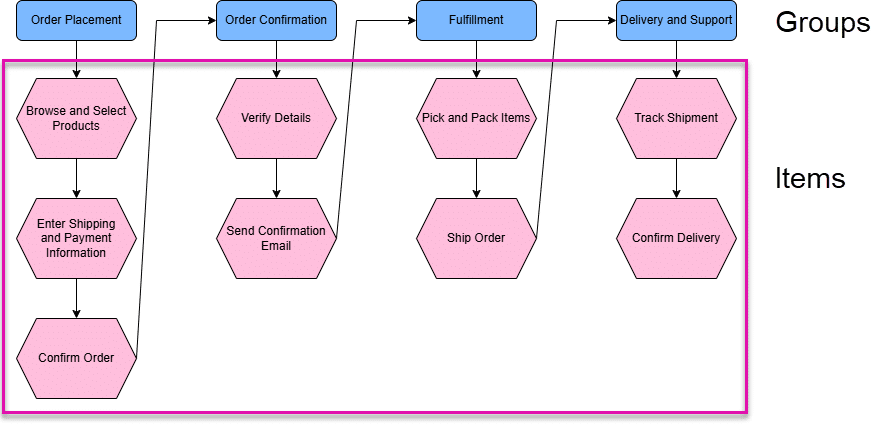
The following is an example of the order tracking process. You will create groups with items in each group. As one item in the group is completed, the tracker shows the next item. When all the items in the group are completed, the tracker jumps to the next group’s first item, and so on, until the order is done.


Note:
Click the Delete icon to remove groups or items in groups.


Note:
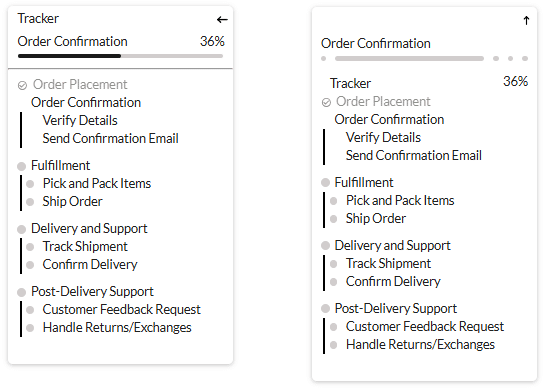
Compare the difference between vertical (left) and horizontal (right):

Note:
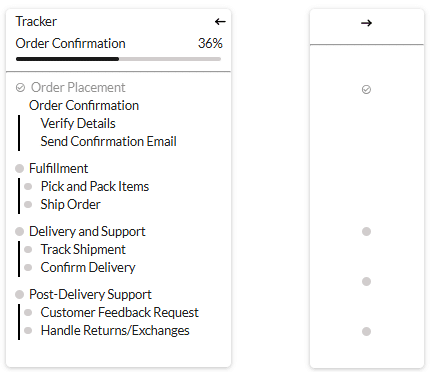
Compare the difference between expanded (left) and collapsed (right):
ARIA (Accessible Rich Internet Applications) accessibility refers to a set of specifications developed by the World Wide Web Consortium (W3C) to improve the accessibility of web content, especially dynamic content and user interface components. ARIA provides a way to make web applications and content more accessible to people with disabilities, particularly those who rely on assistive technologies such as screen readers. This markup is added to the HTML to communicate to users.
Accessibility for all the labels is added automatically but you can change it.
You can add a descriptive label for more information about the tracker widget.










