How can we help you?
Import multiple records into your Word document in a section or table format. The data imported into the Word document is pulled from multiple repeated strips in your Submissions.
You can import multiple records into your Word document as follows:
Ensure you have installed and signed in to the Titan Word add-in.

In this example, a submission is selected.

The section displays in your Word document.

Configure the filter of the submission
Take note of die fields you added to the submission configuration. You will need the exact field names for the table.


The table is displayed in your Word document.
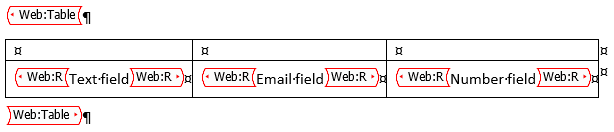
Before previewing or publishing the template, you must configure the section/table filter to use the correct submissionID.
The system has to know which submissionID it must bring back from the Submissions. You can use a hidden field in the Word add-in template that will hold the submission ID or you can bring it from a previous Get that you created in the template.
When you use a another Get, make sure that Get is listed above the Get you are configuring.











