How can we help you?
Use the TitanSignBulkInstantURL Apex class to generate an instant signing URL for multiple Titan Sign templates that will be signed together in a single signing session.
This class creates and saves the signing URL to a designated field on the triggering record. It includes an invocable method that can be called from a Salesforce Flow to automatically trigger the Bulk Sign process and generate the URL for the first signer in the session.
The TitanSignBulkInstantURL Apex class accepts the following input parameters:
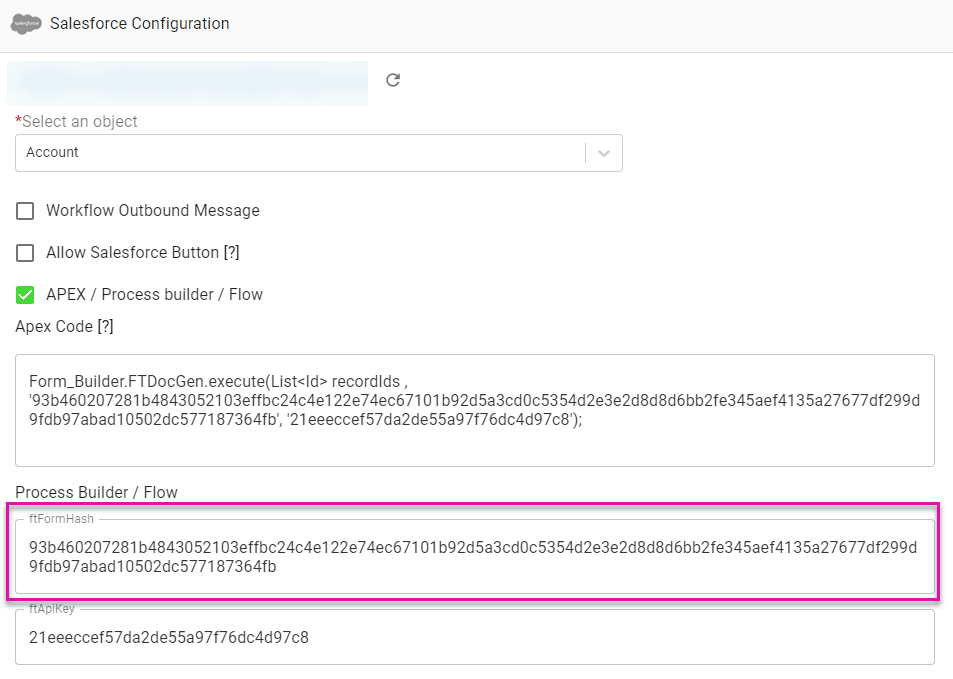
Next, return to your Salesforce Flow and paste the copied value into the formHash field of the Form_Builder_TitanSignBulkInstantURL Action.
To add formHash2 (or additional form hashes), repeat the same process in a different Titan Sign project, then copy and paste each ftFormHash into the corresponding field.
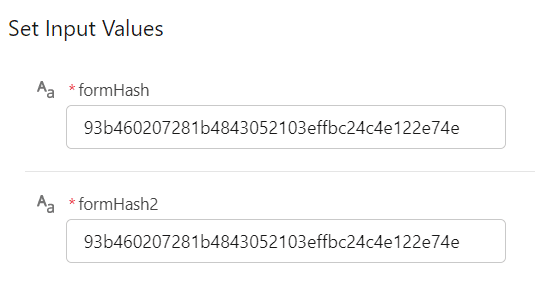
To access formHash3, formHash4, and formHash5, follow the process documented for formHash and formHash2.
The TitanSignBulkInstantURL Apex class returns a Bulk Sign Instant URL that provides access to a single signing session for the included Titan Sign templates. This URL is automatically saved to the field specified in your Flow configuration.
The field selected to store the Bulk Sign URL must be a Long Text Area (minimum 1024 characters) to capture the entire URL without truncation.
The TitanSignBulkInstantURL class is available to all Titan Sign customers and can be added to Salesforce Flows to automate Bulk Sign session creation.









