How can we help you?
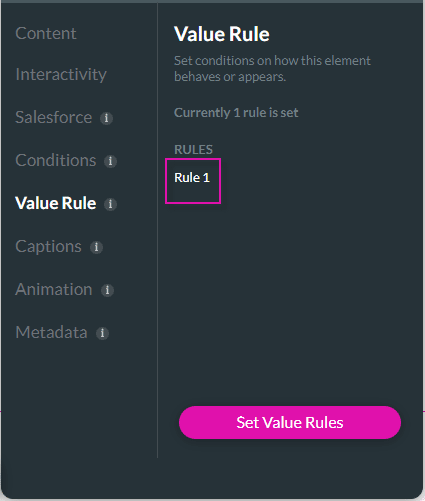
Use the Set Value Rules function to set the acceptable values for an input field. This can improve the efficiency and accuracy when capturing information.



| Operation | Description |
|---|---|
| Contains | Inputs values if it contains the specific text. The input is valid if it begins with the specified text. For example, ‘Am’ for ‘America’. |
| Not Contains | Input and Search Values are used as arguments. If the input value does contain the search value, it is excluded. For example, ‘Am’ will not return the result ‘America’. |
| Changed | If the input has changed (Value A to Value B, NULL to Value A, Value A to NULL). |
| Start with | Input values that start with the specified characters are included. For example, ‘America’ starts with ‘am’, ‘ame’, etc. |
| Ends With | Input values that end with the specified characters are included. For example, ‘America’ ends with ‘ica’, ‘ca’, etc. |
| Equals | Inputs are compared to the text. If the inputs match the text, the content is captured. |
| Equal case | Input fields that match JavaScript to return valid results. |
| Not equal | Inputs that do not match the parameter are included. For example, ‘America’ will display all content that does not contain that value. For example, ‘America’ will include america. |
| Not equal Case | Inputs are compared to the text, excluding the casing. All text contains the same value, but does not match the casing, it will be included. |
| Equal or | Input values that can contain more than one acceptable value. Separate the values with commas to include all results. For example, if ‘professor,doctor’ is stipulated. All results equal to ‘professor’ or ‘doctor’ will be returned. |
| Equal or Case | Input values that contain the specific value or only have a case difference. Separate the values with commas to include all results. For example, if you add ‘Company,’ results for ‘company’ will also be returned. |
| Not Equal or | Inputs that do not match the parameter or the additional values are included. For example, if ‘professor,doctor’ is stipulated, all values that do not contain those specifications will display. |
| Not Equal or Case | Inputs that exactly match or only have a case difference are excluded. For example, if ‘professor,’ is stipulated all results that are not equal to ‘professor’ and a specified case will be returned. |
| Min Length | Inputs that match the minimum character values are included. |
| Max Length | Inputs that match the maximum character values are included. |
| Is empty | Inputs with no values are included. |
| Is not empty | Inputs that contain data are included. |
| Max Count of words | Inputs that match the maximum word count values are included. |
| Min Count of words | Inputs that match the minimum word count values are included. |
| Address validation | Ensure that street and postal addresses exist using Google API Key. |
| Regex | Regular Expressions define filters and specify a search pattern in the text. |
| Custom | Input fields that match javascript to return valid results. |
| Israel ID | Input fields that contain IDs that follow the Israeli format. |
| US SSN | Input fields that contain the Social Security number format. |
| Numbers only | Inputs that contain numerals only are included. |
| Alpha only | Inputs that contain alphabetical letters only are included. |
| Alphanumeric | Inputs that contain both alphabetical letters and numerals are included. |
| Max File Size | Inputs that meet the Maximum File Size will be included. This can be a single or multiple files. The files will be uploaded, but if they do not meet the requirement, they will not be pushed to Salesforce. |
| Min File Size | Inputs that meet the Minimum File Size will be included. This can be a single or multiple files. The files will be uploaded, but if they do not meet the requirement, they will not be pushed to Salesforce. |
| Max Single File Size | A single input that meets the maximum file size. If the file doesn’t meet the requirement, it will not be uploaded. |
| Min Single File Size | A single input that meets the minimum file size. If the file doesn’t meet the requirement, it will not be uploaded. |
| Greater than | Inputs that are larger than the greater than value are included. |
| Less than | Inputs that are smaller than the less than value are included. |
| Between | Input data that falls within a value range is included. For example, numbers must be between 20 and 40, only results after 20 and before 40 will be returned. |
| Not between | Input data that does not fall within a value range is included. For example, not between 20- and40, only results before 20 and after 40 will be returned. |
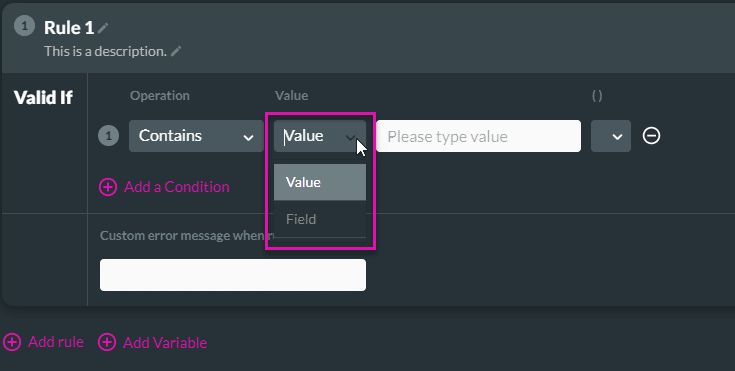
You can choose whether to use a Value or Field.

Brackets can be used to enforce the evaluation to occur in a specific order
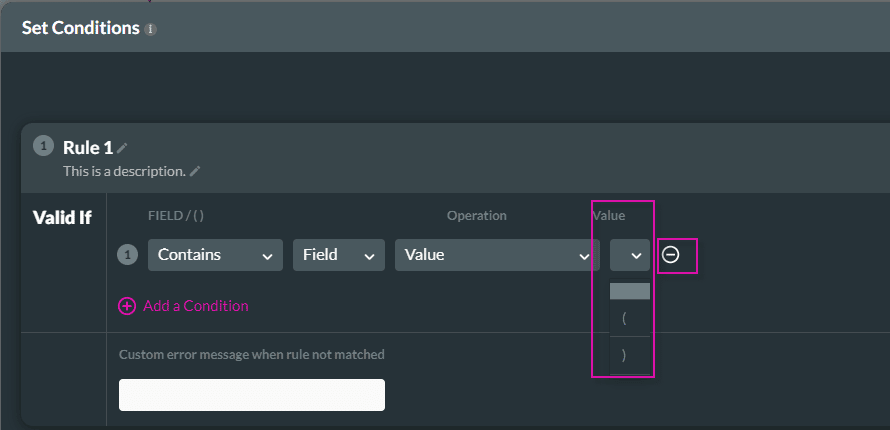
Use the AND/OR to identify the relationship between the conditions.

| Field | Description |
|---|---|
| Boolean True | If the data matches the criteria the values are valid. |
| Boolean False | If the data is different from the criteria, the values are valid. |
| Device | Condition based on the device being used. |


The value rule is added.