How can we help you?
We added options to disable future or past dates and times. This will force a user to only select from an available date and time range.
We added the option to merge or split cells in a form element with more than one column. Read More
You often receive file uploads but can you be sure that they don’t have a virus? Now you can! Read More
You often receive file uploads but can you be sure that they don’t have a virus? Now you can! Read More
We fixed a bug that added duplicate elements to a tablet device layout with an auto-fit container.
When making changes to a row height in power tables and then reverting to the original setting, the height didn’t reset. We fixed this.
There was a bug with continual forms, where the height of the element was doubled if there was content in the second step. The height should be static. We fixed this
We fixed an issue where the file viewer did not consistently load files from the same type one after the other, for instance, when trying to view a jpg file after another jpg file, the second file didn’t load.
There was a bug where the incorrect value would pass to the subcomponent IFrame in a power table with 1000 records when using pagination and sorting. We fixed this.
We made a cosmetic change on the radio element input fields styling screen.
Conditions based on Boolean values from Salesforce were not working properly. We fixed this.
You can add drawer and modal elements from the + menu:
We improved the accessibility of the SmartV mechanism for Titan Web, Titan Sing, and Titan Forms. Special thanks to Imanuel Eldin for bringing this issue to our attention.
The page action on a reload page didn’t clear the value in a lookup field in a repeat strip. We fixed this.
We fixed auto layout responsiveness issues on tablet and large tablet devices.
There were layout responsiveness and missing field issues that we fixed.
We improved accessibility for survey elements. We fixed the Tab Order Wizard to include all the survey elements.
We fixed a bug on the resizing of a multistep container with autofit and a form element.
We added protection that users will not be able to submit a document without the mandatory signature.
Mandatory validation was incorrectly added to an interactive web field. We fixed this.
We fixed a bug in the default condition for a second subcomponent (third level) of power table. The parent condition instead of the child condition was incorrectly referenced.
There was a bug where the Show/Hide functionality on a form element wasn’t applied to the correct row.
We fixed a bug on the stepper element for the icon color of the active step.
There was a bug where the validations on a published project were skipped when they shouldn’t have been skipped. The Debug Mode (Skip Validations) option under Tools in Project Settings is only for administrators and should not affect a published project. This was fixed.
We removed the following options from the modal button on a date field:
Setting the value from a power table to a text field was not working. We fixed this.
The review page didn’t display during the approval process and there was no way to continue to the next step. We fixed this.
We made a cosmetic change to the Value Rule UI.
There were layout responsiveness issues when adding additional steps to a stepper element to different device sizes.
We added validations to payment configurations to make sure users configure the payment correctly.
We fixed a bug where JPG images that were labeled in capitals could not be uploaded. Now both “jpg” and “JPG” are supported.
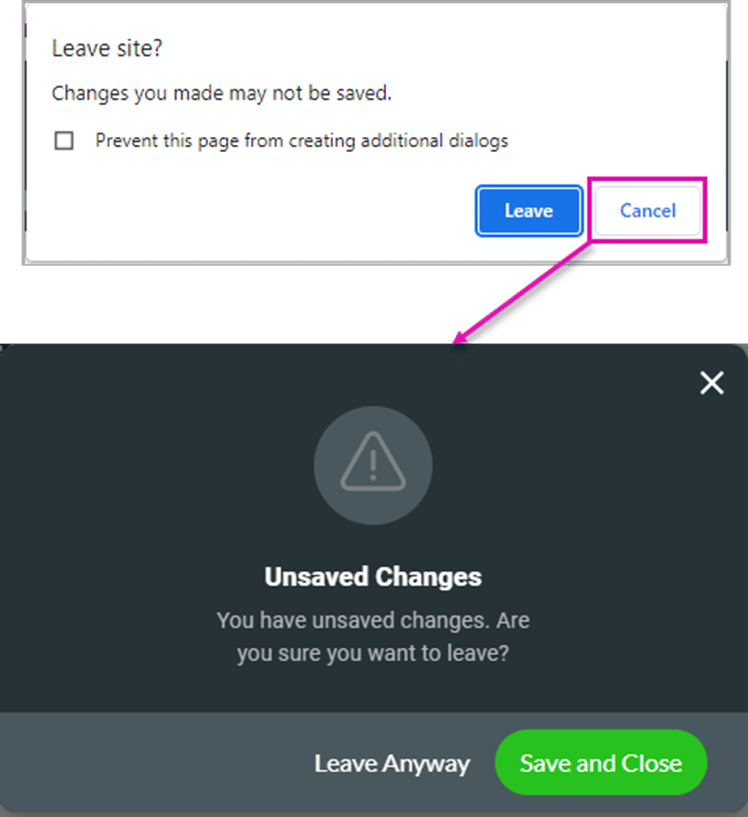
We added protection that will warn a user that they have unsaved changes when they try to close the Titan Sign builder. An alert message will be shown. Clicking on the Leave button will close the page without saving any changes. Clicking on the Cancel button will open a second alert.
We fixed various accessibility issues in Titan Sign on the New Signature window for customers who use screen readers.
The review page didn’t display during the approval process and there was no way to continue to the next step. We fixed this.
We upgraded the Dashboard performance.









