How can we help you?
When you collect addresses through free-text input, users must manually enter street names, cities, and postal codes. This often results in incomplete values, inconsistent formatting, or locations that cannot be validated later. Using Google Maps and Google Places, users search for addresses and places against Google’s location database instead of typing values manually. This ensures the selected address exists and can be resolved to structured location data.
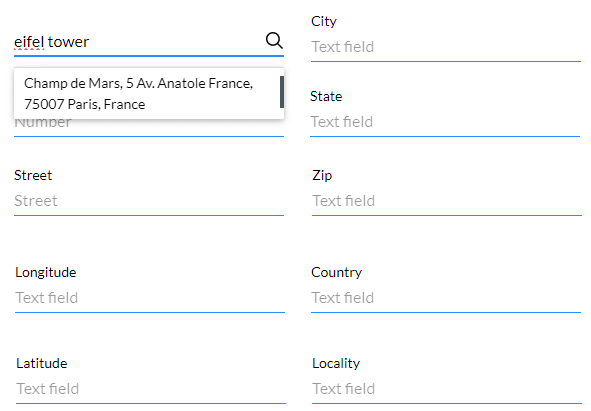
Titan allows you to add an address finder input that connects to Google Maps and Google Places. As the user types, the input returns matching addresses or places within the region you define.
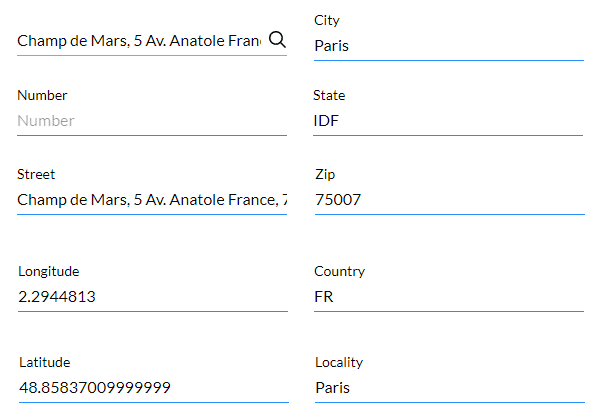
When a user selects a result, the address fields are automatically populated with data returned by Google. This reduces manual input, enforces consistent address structure, and improves the reliability of location data stored in your project.
Note:
Prerequisites:

Note:
In this example we used input fields to show the address information, but you can also map the address information to variables that can be pushed to Salesforce.
Examples of input fields:


| Titan Parameter | Google Maps Platform Description |
|---|---|
| Address | The address that you want to geocode. This is a mandatory parameter. |
| Locality | Indicates an incorporated city or town political entity. |
| Street_address | Indicates a precise street address. |
| Sublocality | Indicates a first-order civil entity below a locality. Some locations may receive one of the additional types: sublocality_level_1 to sublocality_level_5. Each sublocality level is a civil entity. Larger numbers indicate a smaller geographic area. |
| Postal_code | Indicates a postal code as used to address postal mail within the country. |
| Country | Indicates the national political entity and is typically the highest order type returned by the Geocoder. |
| Administrative_area-level_1 | Indicates a first-order civil entity below the country level. Within the United States, these administrative levels are states. Not all nations have these administrative levels. In most cases, administrative_area_level_1 short names will closely match ISO 3166-2 subdivisions and other widely circulated lists; however, this is not guaranteed as our geocoding results are based on a variety of signals and location data. |
| Administrative_area-level_2 | Indicates a second-order civil entity below the country level. Within the United States, these administrative levels are counties. Not all nations have these administrative levels. |
| Administrative_area-level_3 | Indicates a third-order civil entity below the country level. This type indicates a minor civil division. Not all nations have these administrative levels. |
| Street_number | Indicates the precise street number. |
| Route | Indicates a named route (such as “US 101”). |
| Formatted_address | This is a string containing the human-readable address of this location. |
| Latitude | Indicates the latitude of the address. Google returns this location as a LatLng object, not as a formatted string. |
| Longitude | Indicates the longitude of the address. Google returns this location as a LatLng object, not as a formatted string. |
| State | Indicates the state; for example, the address “111 8th Avenue, New York, NY” consists of the following components: “111” (the street number), “8th Avenue” (the route), “New York” (the city) and “NY” (the US state). Also, refer to administrative_level_1. |
| City | Indicates the city, for example, the address “111 8th Avenue, New York, NY” consists of the following components: “111” (the street number), “8th Avenue” (the route), “New York” (the city) and “NY” (the US state). Also, refer to locality. |
Note:
Click here for more information on Google’s Geocoding Service.
Note:
The messages can be changed under Captions:

The mapped fields are populated when the location is selected: