How can we help you?
The Disable Tooltip option is available for different types of elements. The user will not see the tooltip of the text that they enter in the field.
Tooltips give information to the user; however, when they are not necessary for self-explanatory fields, they may make fields look cluttered.


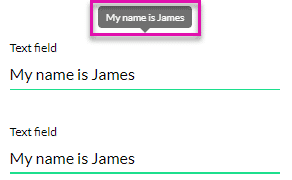
The top field has a tooltip that shows when the mouse hovers over the field. The bottom field has the Disable Tooltip option checked, and no tooltip is displayed.