How can we help you?
We made improvements to the circle slider element.
We added the following:
Choose from a variety of Custom Icons. This creates visual interest in your projects and can convey purpose so users can easily understand and recognize the information required. Read More
We added the option to create folders within folders (subfolders) on the Dashboard. Read More
We added SFTP to Titan Flow. With SFTP, your connection is always secured, and the data between your FTP client and your web server is encrypted.
We fixed a bug where conditions could not be configured for a non-connected Salesforce environment.
Power table input fields were not supported for Run Criteria. Our team fixed this.
We fixed a bug in the bulk update functionality on a power table.
There was a bug on the form element where the new column didn’t display correctly after it was added and resized. This was fixed.
Our team fixed a bug on a form element where it was not possible to delete a column after a row was merged.
A paragraph text element couldn’t be resized in a stepper element. This was fixed.
Our team fixed a bug in the date range element’s styling that displayed the incorrect format.
We updated the structured parameters to the following payment methods
A button that opened a page modal with a table caused a component crash. Our team fixed this.
We fixed bugs on the circle slider element that affected the Hide value and Prefix and Suffix functionalities.
Our team fixed bugs on the styling functionality for the Gallery Carousel element.
The conditions on a multiple picklist element didn’t work as expected. This was fixed.
We fixed a bug related to the right-to-left alignment of the Debug mode button.
The total rows variable for the repeated column didn’t update in a formula/power field after a reset interactivity. Our team fixed this.
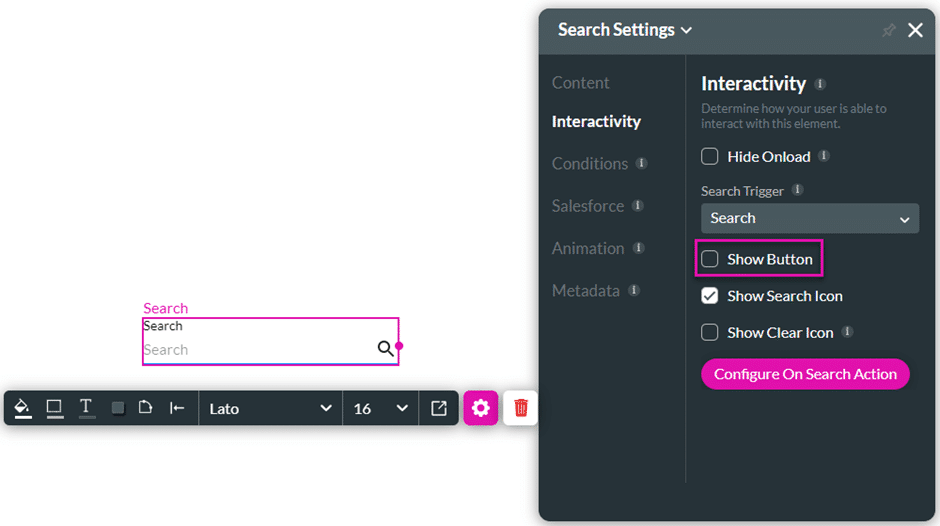
The Show Button option for the search element is now off by default.
We added the option to translate Google Maps in API Keys settings for the Google Maps widget.
There was a bug on single and recurring Stripe payments with SCA (strong customer authentication). Our team fixed it.
We fixed a bug on the currency element where an icon on an RTL project wasn’t aligned as expected.
Changing the value of a picklist field that recalculates a formula field was not triggered correctly. This was fixed.
The size of the address finder widget didn’t change as expected.
We added the option to style borders on the button group and circle slider elements.
A bug occurred when adding a search element to a form. This was fixed.
We made a cosmetic UI change to the Site Menus screen where the Delete Folder menu option could not be seen when the list of pages and folders was long.
We fixed a bug on the image choice element where the images were not placed inside the image choice container.
We fixed a styling bug on the SmartV Login screen.
There was a bug when sizing the icons of the button group element in a form element. Our team fixed this.
We fixed a bug on the form element where input fields could not be resized in an RTL project.
We fixed a bug in the styling of the text area element. We made cosmetic UI changes to the Styling screen.
We updated the translation options for the following elements:
A bug occurred when using the payment widget and not entering a Zip code. Our team fixed this.
When exporting projects between environments that share an organizational email address, a warning will show that the email addresses sent via the Web may need to be fixed, and the user should confirm the Send Via settings on the Configure Email Settings screen.
When changing a custom JS variable, the label didn’t update with the change. This was fixed.
We fixed a bug in the styling of the text area element. We made cosmetic UI changes to the Styling screen.
We fixed a cosmetic bug on the address finder widget’s styling.
We fixed a bug on Stripe payments where the payment was pushed to Salesforce twice.
We made cosmetic UI changes to the Add Slide screen.
The dynamic values for the ranking element didn’t show the Salesforce Get mapping. Our team fixed this.
We fixed a bug that occurred when editing the section in a Word document with nested sections.
The full name interactive input field didn’t show the first name and last name as expected. This was fixed.
We added options for you to set the Dashboard defaults under Settings > Account Settings.









