How can we help you?
We added dynamic Salesforce mapping options to the ranking element. Read More
We added the functionality to add a URL link in a pdf document. The customer can now click on the link and open the web page from a pdf document.
As part of GDPR compliance, we added the option not to store the IP addresses of survey takers. When you activate this option, the IP address of the survey taker is not recorded in Salesforce. Read More
It is possible to shuffle questions in a survey. The order of the question slides is randomized and each survey taker will receive the questions in a different order. Read More
It is possible to shuffle answers. The answers per question element with more than one option (for instance: drop-down, image, ranking, matrix, CES, survey list, select, multi-select picklist, button group, radio button) can be shuffled. Read More
We added dynamic Salesforce mapping options to the ranking element. Read More
We added a Start Over button to allow a survey taker to start the survey from the beginning. We also added an End Now button that will let a survey taker stop and submit the survey at that point. Read More
We added an icon to API Calls to show when there are integration errors.
We added the option to upload an image when logging a case with Titan.
Dashboard > My Account > My Cases > Open a Case

We fixed a bug where long text in the input field spilled over the text field border when the Disable checkbox under Interactivity was checked.
It was possible to change the size of the button root on a stepper element which caused the stepper size to behave unexpectedly. We removed the options to set button root size on a stepper element.
We fixed a bug where a duplicate custom drawer didn’t open. Please note that this fix is applicable to new custom drawers that are duplicated but cannot fix existing duplicated custom drawers. Unfortunately, you will have to duplicate new custom drawers.
We fixed a bug on a normal table element where the conditions worked on Classic Conditions but not on Actions Flow.
We fixed the following bugs:
Editable lookup fields on power table subcomponents didn’t work. We fixed this.
We added caption alignment to radio elements.
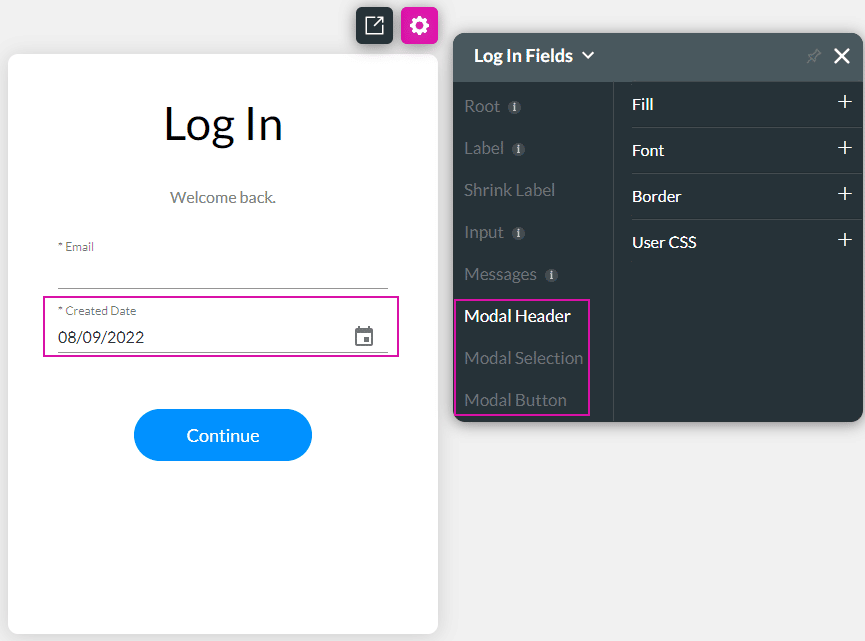
We added styling to the date modals in the SmartV login screen: Modal Header, Modal Selection and Modal Button.
We fixed the positioning of a power table for a LTR project.
When using Titan 2 previewer for DocGen the Preview button on the document is not visible. We fixed this.
There was a bug on a Step node that cleared the parameter passed from Titan Flow to Titan web. We fixed this.
We fixed a bug o a date field that didn’t behave as expected.
There was a bug on time fields in a power table where the text that was discarded didn’t disappear from the UI. The formatting of the time field was displayed incorrectly. We fixed this.
We fixed a bug where the size of the icon on a custom modal affected the size of the title.
We added styling options to the menu and menu options on the input fields element.

We fixed a bug in power tables where the formatting number didn’t sort correctly.
From this version onwards, we do not allow using system variables in the following instances:
We added styling to the hover and clicked options for icons.

We fixed a bug where the Use current date/time option was overridden by a previously used End Date setting.
The styling for columns on a custom drawer was not working when saving a class and trying to use the styling for the column. This was fixed.
We had an option to add SVG for an icon element and an icon in power tables; however, this is not supported. We removed the option not to confuse users.
We fixed the padding for the Head Row in a Matrix under Custom Styles.
There was a bug that didn’t show line breaks when mapping to a long text field in Salesforce. We fixed it.
We added validations to the custom flow for questions to prevent possible human errors.
When you enabled Short URL for a survey and you distributed and cloned the Survey project, and then distributed it again, the short URL from the original projects was used instead of a new short URL. We fixed this bug.
We added web page links on the UI to the following question type elements in Titan Survey:
We added web page links on the UI to the following distribution methods in Titan Survey:
We added web page links on the UI to the following in Titan Survey:
We fixed a bug and you are now able to change the layouts for the Start and Finish slides per device.
You can now edit a Flow node by double-clicking on the node to open the Edit Node screen.
We made a cosmetic change to the API UI.
We added Survey integrations logs to the Live Trace tracker. Settings > Logs > Live Trace.
When using the standard SmartV registrations, without adding custom logic, the ID of the created record will not show on the logs. We fixed this.
On this page









