How can we help you?
We have made exciting enhancements to the version control processes for Web projects. Versioning allows you to create and store multiple snapshots or iterations of your website, enabling you to revert to previous versions if needed and keep a record of changes for reference or collaboration purposes. Read More
We added an “Ensure filled in %” checkbox when configuring a mandatory signature. When this option is enabled, the signer must make a signature larger than the percentage specified in the “Ensure Fill Value” field in the signature box. This will prevent the signer from simply making a dot in the mandatory signature field. We updated this article.
We added the ACH parameter to Stripe payment configurations. Read More
We enhanced the SSO authentication mechanism with Salesforce or another third party as an Identity Provider (IDP) to verify user credentials and grant access to various connected applications. We now validate that a user has a valid SSO session as well as their identity. Read More
We enhanced the functionality to export a project from one account to another (for instance, from the sandbox to the production environment) without changing the project ID. This will ensure that all the project integration logs, submissions, and payment configurations will still work correctly.
The system uses the improved version control to create a new version in the production environment.
The project is no longer deleted from the destination environment. This change is relevant to Web, Survey, and Forms 2.0.
We improved the dynamic background image settings for a strip.
The label of a checkbox moved to the side of the element instead of being at the top. Our team fixed this.
A Salesforce Push action incorrectly didn’t run on an After Logout action. This was fixed. A Finish Flow node is needed.
We fixed a bug where the contents of the Layer List disappeared when the Power Table Settings screen was open, and a user right-clicked on a power table component in the Layer List.
There was a styling bug on the carousel container where the back button wasn’t working as expected. Our team fixed this.
A value in a field of a power table with SF LWC enabled was cleared instead of saved. Our team resolved the issue.
Users were able to add form elements inside a form. Nested forms are not allowed.
Web Page-level conditions incorrectly ran twice. This was fixed.
An error occurred when the Custom Submit Actions Gear icon was clicked. Our team resolved this issue.
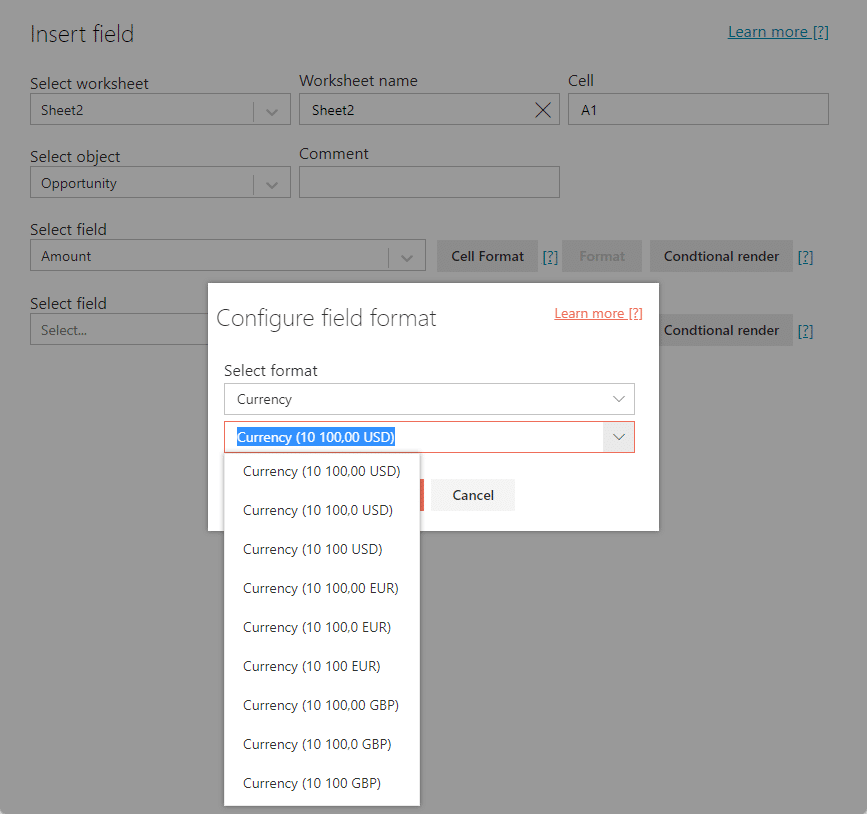
We expanded the list of currency options when inserting a field in the Excel add-in.
We made UI changes to the Edit Submission State screen. The different sections in the Forms project are shown.

On this page









