How can we help you?
We have updated our authentication flow to support Google’s transition to Federated Credential Management (FedCM) APIs, ensuring compatibility before the mandatory adoption of June 30, 2025. Read More
Titan Web now supports Bit payments for the Tranzila payment method. This allows customers in Israel to make payments using the Bit application on their mobile phones.
We updated the project deletion confirmation message to provide more clarity. Now, when you delete a project, you’ll see a note informing you that the project will be moved to the Recovery Center, from where you can either restore it later or delete it permanently. This ensures users are aware that projects are not permanently deleted.
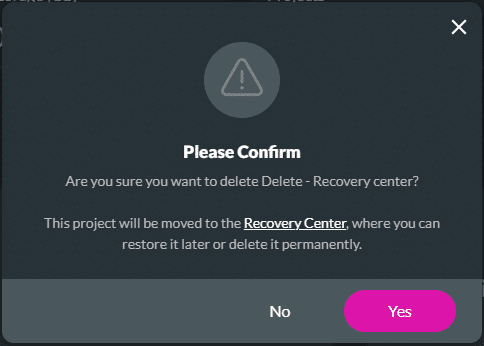
This update improves transparency and makes it easier to manage deleted projects.
Learn more about the recovery center.
Resolved an issue where the browser did not prompt users to install the project as a Progressive Web App (PWA) and incorrectly displayed a notification about a new version being available. This fix ensures proper PWA installation prompts and accurate version update notifications.
Fixed an issue that occurred on repeat auto-fit container validation when using the currency input element.
Fixed an issue that affected custom OTP session authentication.
Fixed a translation issue that occurred on hybrid survey questions.
Added protection for signature elements by limiting file size to 500 KB, allowing only PNG and JPEG formats, and enforcing a single file upload.
Fixed an issue where the Back button was shown when editing a User/Group or External Flow action node. Clicking this button led to an empty screen. The Back button now returns the user to the main Flow screen as expected.
Addressed an issue where the filter for Titan projects on the Start Node showed all project types. It now correctly displays only the relevant projects. All other filters were tested, and the appropriate results are returned.
Resolved a number of bugs:
Learn more about the loop node.
Resolved a cosmetic UI issue on the email settings configuration screen.
Fixed an issue where pressing the Backspace key on the keyboard while focusing on the Flow Editor’s modal background incorrectly deleted all nodes or closed the modal. The Backspace key now only triggers actions when an input field is in focus, preventing accidental data loss and improving the user experience. This fix ensures that the Backspace key has no effect when the background or non-editable areas are selected.
Fixed an issue where users without sufficient permissions briefly saw the Recovery Center in the sidebar after deleting a project. It is now correctly shown based on user roles.
Addressed an issue where the Select all option in a folder on the Dashboard selected all projects in the account. It now correctly selects only the projects within the selected folder.
Learn more about folders.
On this page









