How can we help you?
An error occurred when a user searched for a value using a lookup field in a repeat strip with more than one column in the modal. Our team fixed this.
We fixed a bug on the Post message functionality that occurred on iPhones.
The dynamic translation on a picklist didn’t work correctly. We fixed this.
We added support for tabbing to rich text elements when using the Tab key on the keyboard.
A bug occurred when changing the styling of a toast message. This was fixed.
We fixed a cosmetic UI error on the “Configure Project Email Settings” and “Configure Project Payments Settings” screens that affected the Kebab icons.
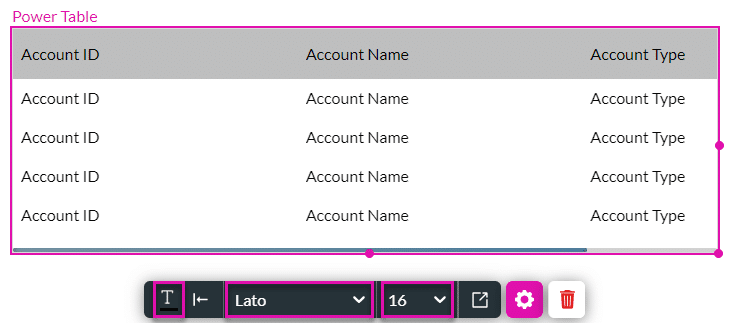
We added the options to style the text color, font family, and text size from the quick menu of the power table.
We fixed the right-click options on the strip when using a responsive modal.
Our team fixed a bug that occurred on a picklist with data from SAP.
The auto-suggest option on a lookup field in a power table could not be styled. Now it can.
The auto-grow functionality on a power table in an LWC project didn’t work as expected, and the lookup modal was displayed too small. We fixed this bug.
Our team resolved an issue in which the value mapped to the label was incorrect when affecting a static drop-down element.
We added the following columns to the CSV file for bulk translations: Page Name and Page ID.
We fixed the Aria label for a single-value checkbox.
Our team fixed an issue where a custom modal with an embedded multi-step container and a form didn’t resize correctly.
We made a small cosmetic change on the Default Question Flow screen that affected the + icon.
The document was blank when selecting multiple records in Salesforce List View and trying to merge generate. Our team fixed this.
The column span in the summary row of a table didn’t work correctly when “Formula” was selected as the field type. This was fixed.
We fixed some issues with accessibility and the read-out-loud functionality.
The Sign project unexpectedly closed when a signature was not selected, and the Apply button was clicked. Our team fixed this.
We made improvements to the accessibility of the signature modal.
We fixed a bug where the language option from the Sign project was not used in the Sign wizard.
Our team resolved an issue that occurred when creating a push integration to SAP.
We fixed the following issues on an e-commerce project checkout page:
We also added fields for the following mapping options in a Salesforce push:

We added the option to hide the “Search” field and the “Back to Catalog” link.










